










































May 8, 2026

Affirm Disputes: A Merchant's Complete Guide to Prevention, Evidence, and Winning Claims

Tom-Chris Emewulu
Marketingmanager, Chargeflow
Dit is een h2-titel die automatisch uit de rich text wordt gegenereerd.

Terugboekingen?
Dat is niet langer uw probleem.

Recover 4x more chargebacks and prevent up to 90% of incoming ones, powered by AI and a global network of 20,000 merchants.

Meer dan 600 beoordelingen
Geen creditcard nodig.
Kort gezegd:

Affirm disputes follow two distinct pathways. Standard BNPL installment loans are handled directly by Affirm, while Affirm Card transactions run through Visa's rails and follow traditional chargeback mechanics. For standard disputes, your funds are withheld from the moment the customer files, but your 15-day response window doesn't open until Affirm notifies you. Losing costs you the disputed amount plus a $15 fee. The merchants who win consistently document everything at fulfillment, submit targeted evidence before the deadline, and treat dispute management as a standing operational function.

Affirm is a buy-now-pay-later (BNPL) fintech company that allows consumers to finance purchases through installment loans at the point of sale. This payment model can expand a merchant’s customer base and increase conversion rates. But it also introduces a distinct payment dispute process that you must understand and navigate carefully.

Affirm disputes arise when customers experience transaction issues such as non-delivery, product defects, returns, or unauthorized charges, and are unable to resolve them directly with you. At that point, Affirm steps in as an intermediary. They review all submitted evidence from both sides rather than automatically ruling in the customer’s favor, as some merchants might assume.

The stakes have grown significantly following regulatory shifts in 2024, when the Consumer Financial Protection Bureau (CFPB) extended credit card-like consumer protections to BNPL products, including Affirm. These protections cover dispute investigations, refunds for returned items, and billing statement requirements. Critically, they allow customers to open disputes on purchases that may be considerably older than the previously common 60-day window.

For merchants, this means greater exposure to retroactive claims, a more structured adjudication process, and increased vulnerability to bad-faith dispute filings. This guide walks you through every dimension of Affirm disputes: how they work, how to prevent them, how to respond effectively, and how to protect your revenue at scale.

How Affirm Disputes Work and Notifications

Before responding to any Affirm dispute, you need to understand a foundational distinction: not all Affirm disputes follow the same path. The process and your exposure differ significantly depending on which Affirm product the customer used at checkout.

Two Affirm Dispute Pathways

1. Standard Affirm BNPL Disputes (Installment Loan Transactions)

This is the most common Affirm integration, including Pay in 4 and longer-term installment loans offered directly at checkout. When a customer disputes a transaction made through this product, the dispute is filed directly with Affirm, not a card network.

This is a critical distinction for merchants accustomed to traditional credit card chargeback processes. There is no Visa, Mastercard, or Amex network involved. That means:

  • No automatic fund reversal triggered by a card network
  • No chargeback ratio impact on your payment processor account
  • Affirm functions simultaneously as the lender, payment intermediary, and dispute adjudicator

The process is closer to internal arbitration than a traditional chargeback. Affirm requests evidence from both the customer and you, then reaches a conclusion based on what best substantiates the claim in their reasonable assessment. Evidence quality is the deciding factor. Affirm does not automatically side with the customer.

If the dispute is found in the customer’s favor, you are responsible for reimbursing Affirm for the disputed amount, in addition to a dispute fee. This fee applies regardless of the dispute amount, making low-value disputes disproportionately costly if lost. (See Financial Impacts section for full fee details.)

2. Affirm Card Disputes (Virtual or Physical Visa Card)

Affirm also offers a consumer-facing Visa card, available as a physical card or a one-time-use virtual card, which customers can fund with Affirm financing and use wherever Visa is accepted. When a transaction is made with the Affirm Card, it runs through Visa’s card network. That means disputes follow traditional chargeback mechanics.

For merchants, this carries different operational implications:

  • The dispute flows through your payment processor and acquiring bank, not the Affirm Merchant Portal
  • Standard Visa dispute resolution rules and timelines govern the process
  • Your chargeback ratio can be affected, with downstream risk to your merchant account health
  • You respond the same way you would to any Visa chargeback, through your processor’s dispute management system

If a dispute arises through your processor rather than the Affirm Merchant Portal, a virtual or physical Affirm Card is almost certainly the product involved.

How the Standard BNPL Dispute Process Unfolds

For the more common standard BNPL disputes, the process follows a defined sequence:

  1. Customer contacts Affirm: Typically, after attempting to resolve the issue directly with the merchant, though in practice many disputes are opened without meaningful prior merchant contact. Post-2024 CFPB alignment, Affirm no longer strictly enforces merchant-first resolution as a prerequisite.
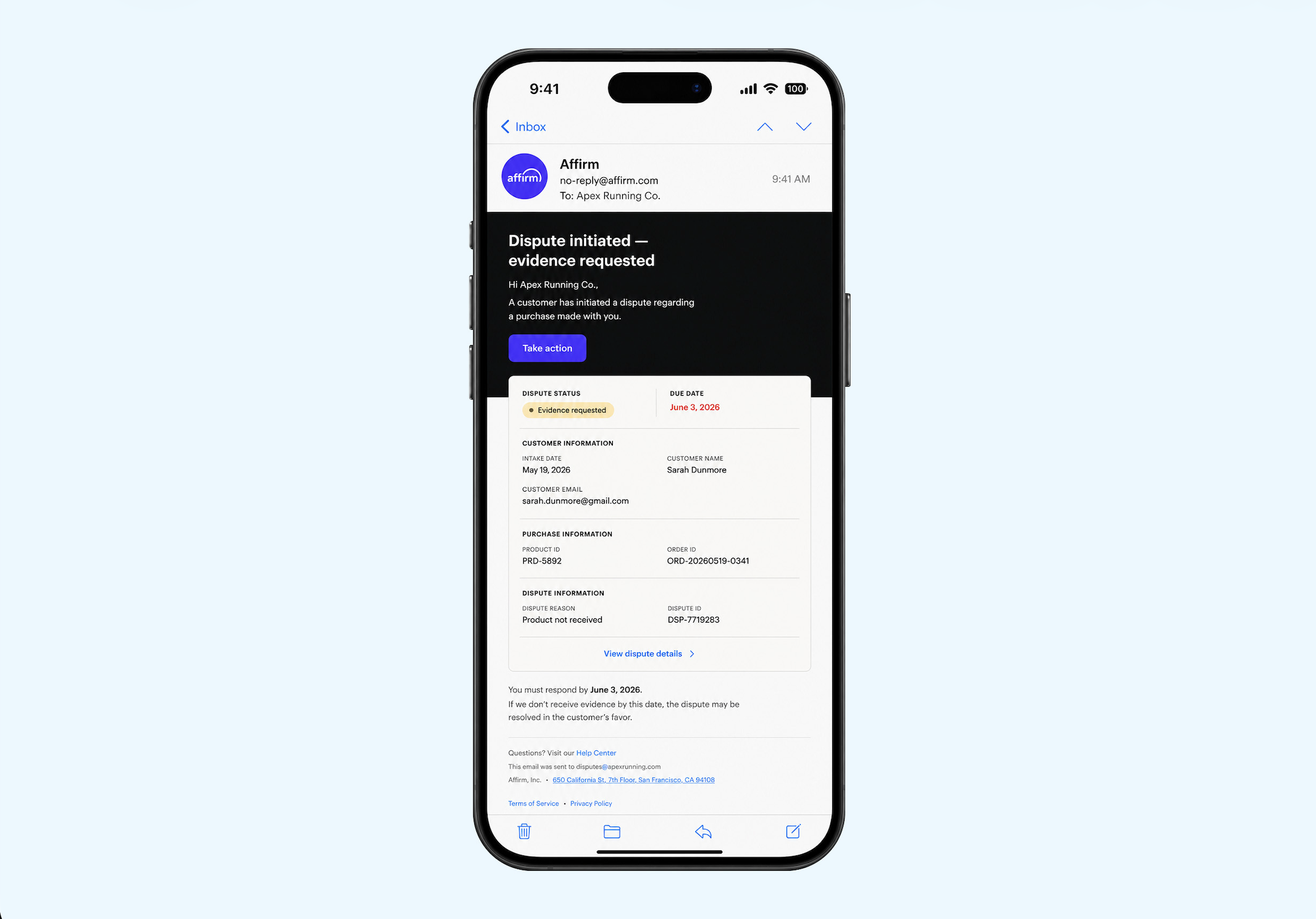
  2. Affirm opens the dispute and notifies the merchant: You receive an email (“Dispute Initiated – Evidence Requested”) and the dispute appears in the Affirm Merchant Portal. The notification includes the reason for the dispute, transaction details, and your response deadline.
  3. Merchant submits evidence or accepts early: In cases where the outcome is clear-cut, such as a confirmed non-delivery, the portal may offer a “Refund Loan” button, allowing you to accept the dispute without going through a full evidence review. Otherwise, you contest with documentation. Full timeline details are covered in the Timelines & Resolution Process section.
  4. Affirm reviews and adjudicates: Once all evidence is received, Affirm issues a decision and notifies both parties.
  5. Resolution is applied: If the dispute is found in the customer’s favor, Affirm issues a refund and debits you accordingly, plus the applicable fee. If found in the merchant’s favor, the original transaction terms hold, and any withheld funds are released.

📍Note: Customers can open multiple disputes against the same transaction. Treat each as a standalone case requiring its own evidence submission.

Affirm Dispute Notification Checklist: What to Watch For

Channel What Merchants See
Email Notifications Dispute initiation alerts, evidence requests, reminder emails (commonly sent 7 days and 1 day before the response deadline), and final case outcomes.
Affirm Merchant Portal Active dispute tracking, status updates, evidence submission tools, and the “Refund Loan” option for accepting customer claims without contesting.
Payment Processor Dashboard Visibility into Affirm Card and virtual card disputes only, which are processed as standard Visa chargebacks through the processor’s dispute interface.

Financial Impacts of Affirm Disputes on Merchants

Affirm disputes can affect your profitability through payment reimbursements, dispute fees, temporary cash flow disruptions, and operational overhead. Understanding these impacts helps you prioritize prevention, fulfillment accuracy, and strong evidence submission.

Direct Costs When You Lose a Dispute

If Affirm rules in the customer’s favor on a standard installment dispute:

  • You reimburse Affirm for the full disputed purchase amount
  • You pay a $15 dispute fee per incident for U.S. disputes (CA$20 in Canada; £10 in the UK)
  • Dispute-related and transaction-related fees associated with the purchase are generally non-refundable

Affirm may recover these amounts by debiting your linked bank account, deducting from future payouts, or issuing an invoice. Past-due balances may accrue interest of up to 1.5% per month, or the maximum permitted by law.

If you win the dispute, you bear no liability for the disputed principal or related interest, and any withheld funds are released.

Cash Flow and Operational Disruptions

  1. Funds withholding: Affirm withholds the disputed amount from the moment a customer files, before you are even notified. Depending on review timelines, this can create meaningful cash flow interruptions, particularly when multiple disputes are open simultaneously.
  2. Time and labor costs: Dispute management requires real operational effort. Staff may need to gather order records, compile delivery or fulfillment evidence, respond within required timelines, and coordinate across customer service, logistics, and fraud teams.
  3. Inventory exposure: If merchandise has already been shipped before a dispute is filed, a ruling in the customer’s favor means losing both the revenue and the product. In some cases, you also absorb shipping and restocking costs. Where friendly fraud is involved, goods that are never returned often surface in secondary markets, creating a 'sales cannibalization' effect on top of the direct loss.
  4. Non-refundable transaction costs: Even when a dispute is lost, you may still absorb original transaction-related fees.

Longer-Term Business Risk

  1. Increased operational scrutiny: Persistently elevated dispute activity may draw underwriting or operational scrutiny from payment providers and BNPL partners, including Affirm.
  2. Reduced margin efficiency: Frequent dispute losses raise the effective cost of accepting Affirm by adding reimbursement obligations, dispute fees, operational overhead, and potential inventory losses on top of normal processing costs.
  3. Accounting and reconciliation complexity: Lost disputes may require adjustments to revenue recognition, cost of goods sold, refunds, inventory reconciliation, and potentially bad-debt treatment.

For high-volume or low-margin businesses, these costs accumulate quickly. Prevention is the highest-leverage response.

Common Affirm Dispute Reasons and Prevention

Affirm disputes commonly fall into a handful of standard categories. Reducing dispute volume and improving outcomes comes down to prevention practices paired with relevant, dispute-specific evidence.

Here are the notable Affirm dispute types and how to reduce them.

1. Product Not Received (Non-Delivery/Late Delivery)

For this case, the customer claims the item never arrived, or arrived much later than expected. To prevent product delivery disputes:

  • Set realistic shipping timelines on product pages and at checkout.
  • Provide tracking promptly and use reliable carriers.
  • Send shipment and delivery confirmations.
  • Review and verify high-risk or mismatched addresses.

Evidence that helps overturn such an order delivery dispute includes:

  • Carrier tracking showing delivery to the customer’s checkout address.
  • Order and fulfillment records that align with your stated timelines.

2. Product Unacceptable (Damaged, Defective, or Not as Described)

Here, the customer is claiming the item they received was damaged, defective, or materially different from what you advertised on your store. Standard prevention best practices include:

  • Using high-quality, multi-angle photos and accurate descriptions.
  • Specifying precise dimensions, materials, sizing, and notable limitations.
  • Applying consistent quality control and protective packaging.

Evidence that helps overturn such cases:

  • Screenshots or exports of the product listing as it appeared at purchase time.
  • Internal QA/packing records or photos of items before shipment, where available.

3. Cancellation or Return Not Processed

Cancellation or return not processed disputes arise when the customer claims they canceled or returned the item, but did not receive a refund or credit. To prevent them:

  • Display cancellation and return policies clearly before and at checkout.
  • Process returns and refunds promptly according to your policy.
  • Provide clear return instructions and labels where you support them.
  • Use RMAs or similar tracking so each return can be tied to an order.

Evidence that helps overturn such disputes includes:

  • Policy excerpts or screenshots showing the applicable cancellation/return terms.
  • Return tracking and internal system logs showing when you received and processed (or did not receive) the return.

4. Incorrect Charge

Disputes with incorrect charge reasons arise when the customer questions the amount charged, including taxes, shipping, or other fees. To prevent these:

  • Show itemized totals (items, taxes, fees, shipping) before order confirmation.
  • Keep pricing, promotions, and fees consistent between the product page and checkout.

Evidence that helps overturn such cases includes:

  • Itemized checkout and order receipts that match your advertised pricing and policies.
  • Screenshots of pricing, discounts, and fee disclosures at the time of purchase.

5. Duplicate Charge

Affirm disputes under duplicate chargeback reasons occur when the customer believes they were charged multiple times for the same order.

This can be a legitimate clerical error or a technology malfunction. To prevent such cases, add safeguards to prevent duplicate order submission or payment capture, and reconcile orders and payments regularly to catch and correct duplicates early.

Evidence that helps overturn duplicate charge cases includes records showing separate, legitimate orders or authorizations, if multiple charges are valid, and proof of any refunds or reversals already issued, when applicable.

A Note on Friendly Fraud

Not all disputes reflect genuine customer grievances. Some are filed by customers who received their order and are exploiting the dispute process to obtain a refund without returning the merchandise. In these cases, the financial exposure extends beyond the disputed amount. Goods that are never returned frequently surface in secondary markets, compounding the revenue loss.

We’ve covered this in our chargeback fraud guide.

Sample of Affirm dispute notification

Step-by-Step: Responding to Affirm Disputes in the Merchant Portal

When a dispute arises, your response window is defined, your evidence requirements are specific, and the outcome is binding. This section walks through every step of the process as Affirm currently documents it.

Step 1: Read the Notification Email Before Acting

When a customer submits a dispute, Affirm sends a notification email with the subject line “Dispute Initiated – Evidence Requested.” This email is your starting point and contains everything you need to triage the dispute.

The email includes:

  • Due date: your response deadline
  • Intake date: when the customer filed
  • Naam en e-mailadres van de klant
  • Product ID and Order ID
  • Dispute reason: this determines what evidence you need to gather
  • Betwist bedrag

📍Note: Replies to the dispute initiation email are not supported. You must accept or respond through the web form or the Merchant Portal.

Step 2: Choose Your Access Path

Affirm currently provides two ways to respond, depending on your account setup.

Path A: Web form (available to all merchants)

Click the “Take Action” button in the dispute initiation email to access the web form, where you can view the dispute reason, customer commentary, and evidence. After submitting your response, a confirmation message is shown, and the initial web form link expires; your submission is final. Have your evidence fully prepared before you submit.

Path B: Merchant Portal Disputes Dashboard (rolling out)

Merchants with Dashboard access are redirected to the Dispute Detail Page, which displays the Charge ID (Affirm’s loan identifier associated with the purchase), the Opened Date, and the disputed amount. The Dashboard provides a persistent view of all open and closed disputes and allows ongoing access, unlike the web form’s single-submission flow. The underlying dispute process is the same across both paths.

📍Note: The Disputes Dashboard is currently being tested with a subset of merchant partners. If your account does not yet show it, the web form remains fully functional.

Step 3: Review the Dispute Details and Customer Evidence

Before deciding how to respond, fully assess what you are dealing with.

Within the web form, navigate to Overview > Customer Evidence, then click each line item to download it. Review the dispute reason, the customer’s narrative, and any attached files before forming your response.

Not all cases include supporting files. Some disputes provide only a written explanation with no corroborating documents. A thin customer submission does not guarantee a merchant win. Assess and respond to the substance of the claim regardless.

Cross-reference the dispute against your internal records: fulfillment logs, shipping confirmations, customer communications, and return or refund history.

Step 4: Make Your Decision: Accept or Contest

Option A: Accept the Dispute

If the customer’s claim is valid, or the cost of contesting outweighs the disputed amount, you can accept it directly. For purchases that were never delivered or delivered later than promised, Affirm no longer requires the customer to provide evidence. In these cases, if you agree with the claim, click the “Refund Loan” button in the portal.

Affirm says processed refunds are not reversible. Confirm the refund amount before submitting. To refund a different amount than what is being disputed, contact resolutions@affirm.com before accepting.

Option B: Contest the Dispute

If you have evidence that contradicts the customer’s claim, contest it. Prepare all documentation before opening the web form, since your submission is final once made.

Step 5: Submit Your Evidence and Written Rebuttal

Evidence requirements vary by dispute reason:

Dispute Reason Strong Merchant Evidence
Item not received Carrier tracking confirming delivery, shipment records matching the customer’s address, and signature confirmation where available.
Item not as described / defective Product listing and description at time of sale, product photos, inspection or quality-control records, and customer communications acknowledging receipt or use.
Unauthorized transaction Identity verification records, device and IP data tied to the order, login activity, and order confirmation sent to the customer’s verified email address.
Return or refund not processed Proof the refund was issued, return policy shown at checkout, return authorization records, and carrier tracking confirming return delivery.
Delivered late Carrier tracking history, delivery estimates disclosed at checkout, shipment delay notifications, and updated delivery confirmations.

In addition to documentation, submit a written rebuttal that directly and factually addresses the specific dispute reason. Affirm resolves disputes in favor of the party that, in its reasonable view, best substantiates its claim. Reason code eligibility also affects outcomes. targeted, relevant evidence carries more weight than thorough documentation of the wrong issue.

Step 6: Monitor Status and Await the Decision

The Disputes Dashboard shows statuses including Action Needed (awaiting your feedback), Under Review (being reviewed by Affirm), and Merchant Won (adjudicated in your favor). Resolution outcomes and timelines are covered in full in the Timelines & Resolution Process section below.

Operational Notes

Affirm’s Merchant Portal has no aggregate view across stores. Each must be monitored individually. Customers can also open multiple disputes on the same transaction, each requiring a fresh evidence submission regardless of prior outcomes. Miss a 15-day deadline on any of them, and the dispute is decided without you, automatically, and against you.

The $15 dispute fee compounds this. At scale, losses from winnable disputes that weren’t responded to properly aren’t just the disputed amounts; they’re the fee on top of several other costs. Add the manual burden of assembling shipping records, order confirmations, and communications for each case, and what you really have is a part-time job that scales with your transaction volume.

Chargeflow is built for exactly this. It centralizes dispute management across stores, automates evidence collection, tracks deadlines, and handles BNPL workflows natively, on a success-based model where you only pay for disputes won.

Affirm Dispute Timelines & Resolution Process

Knowing Affirm’s dispute timeline is crucial, and the clock starts before you’re notified.

Phase 1: The Dispute Opens (Day 0)

When a customer files a dispute, two things happen immediately and silently: Affirm begins gathering information from the customer, and the disputed amount is withheld until the dispute is resolved. The merchant’s funds are on hold from this moment, not from when the notification arrives.

Affirm only sends a dispute initiation notice when action is required from you. As a result, disputes can appear in your settlement report while Affirm is still gathering information from the customer, before your response is requested. Your settlement report is, therefore, an early warning system. A dispute appearing there before any email notification means the clock on your funds has already started, even if your response window hasn’t opened.

Post-July 2024: Due to regulatory change, customers may open a dispute after shopping with you and are not limited to a post-purchase deadline. There is no safe point after which a transaction is dispute-proof.

Phase 2: Merchant Notification & Response Window (Days 1–15)

Once Affirm has gathered sufficient information from the customer, the dispute initiation email arrives, and your 15-day response window opens. Reminders are sent 7 days and 1 day before the due date.

This window is firm. If you do not respond by the deadline, Affirm proceeds to adjudication using only the customer’s submission. A non-response is not treated as a neutral position. It hands the case to the other side.

Phase 3: Affirm’s Review Period (Up to 15 Days After Evidence)

Once both parties have submitted, Affirm reviews the evidence and communicates the adjudication outcome within 15 calendar days of evidence collection. The decision is delivered via email and is also visible in the Disputes Dashboard under the Status column.

During this review period, disputed funds remain withheld, and the customer’s loan payments remain paused, a cash flow reality that merchants at volume feel acutely when multiple disputes are open simultaneously.

Phase 4: Resolution

Two outcomes are possible:

Merchant wins: You are not liable for any amount of principal or interest related to the disputed transaction, and any withheld funds are released.

Customer wins: Affirm refunds the disputed amount to the customer. You reimburse Affirm for that amount and pay the applicable $15 dispute fee, collected through bank debit or invoice within 30 days.

According to Affirm’s published policy, Affirm may alter a previous decision after further review, based on evidence available, whether during or after the term of the applicable Merchant Agreement. You can direct questions about a specific ruling to the email: resolutions@affirm.com.

Full Timeline at a Glance

Phase What Happens Timing
Day 0 Customer files a dispute. Affirm immediately withholds the disputed funds and begins collecting transaction details and information from the customer. Immediate
Ongoing The dispute appears in your settlement and reconciliation reports before you receive any formal notification. Your settlement report is the earliest signal a dispute has been filed. Pre-notification
On notification¹ Affirm notifies you once it has gathered sufficient information from the customer. This triggers your 15-day response window. The gap between Day 0 and notification is variable — not a fixed interval. On notification
Day 8 of window Affirm sends a reminder email with 7 days remaining before your response deadline. Mid-window
Day 14 of window Affirm sends a final reminder email with 1 day remaining before your response deadline. Near deadline
Day 15 of window Your response window closes. If no response has been submitted, Affirm proceeds to adjudication based solely on the customer's submission. Hard cutoff
Review period Affirm reviews submitted evidence from both parties and communicates the adjudication outcome. Disputed funds remain withheld during this period. Within 15 days of evidence collection
Post-decision Merchant wins: withheld funds are released; no liability for principal or interest.

Customer wins: Affirm refunds the customer and debits the merchant for the disputed amount plus the applicable dispute fee, collected via bank debit or invoice within 30 days.
On resolution
¹ The notification date is not a fixed interval from Day 0 — it varies depending on how long Affirm takes to gather sufficient information from the customer.

Conclusie

Affirm disputes are fundamentally different from traditional card chargebacks, and treating them the same way is one of the most common and costly mistakes merchants make. Affirm is simultaneously the lender, intermediary, and adjudicator. Evidence quality determines outcomes. Deadlines are hard. And since July 2024, no transaction is beyond the reach of a dispute filing.

The merchants who manage Affirm disputes most effectively share three habits: they document everything at the point of fulfillment, they respond to every dispute with targeted and relevant evidence before the deadline, and they treat dispute management as an operational function.

At low dispute volumes, the manual process described in this guide is workable. As volume grows, the economics shift. Missed deadlines, inconsistent evidence, and the compounding cost of winnable disputes lost to operational gaps make automation the natural next step. That's where a purpose-built solution like Chargeflow earns its place.

DEEL DIT ARTIKEL

Terugboekingen?
Dat is niet langer uw probleem.

Recover 4x more chargebacks and prevent up to 90% of incoming ones, powered by AI and a global network of 20,000 merchants.

Meer dan 600 beoordelingen
Geen creditcard nodig.
abonneren

Het laatste nieuws over terugboekingen, fraude en e-commerce, rechtstreeks in je inbox. Elke week.

Meld je nu aan en mis de nieuwste trends nooit meer!
Door je e-mailadres op te geven, ga je akkoord met onze Servicevoorwaarden en privacyverklaring
Schema met gestreepte en gebogen lijnen die gesegmenteerde bogen vormen, gemarkeerd door drie blauwe ruitvormige markeringen aan de linkerkant.Een abstract ontwerp met een cirkelvormig raster en blauwe ruitvormige markeringen op een halfzwarte, halfwitte achtergrond.
Veelgestelde vragen

Vragen?
– wij hebben de antwoorden.

Waarin verschilt Chargeflow van Justt?

Chargeflow verzamelt automatisch gegevens uit tientallen externe bronnen. Dit zorgt voor een veel grotere dekking en aanzienlijk betere slagingspercentages, omdat het ingediende bewijsmateriaal veel uitgebreider en overtuigender is.

Hoe gaat Chargeflow om met terugboekingen?

Chargeflow verzamelt gegevens zoals bestelinformatie, berichten van klanten en betalingsgegevens. Het stelt een volledig dossier voor geschillen voor je samen, zodat je er zelf geen vinger naar hoeft uit te steken.

Kan Chargeflow terugboekingen van meerdere betalingsverwerkers verwerken?

Ja! Chargeflow werkt samen met meer dan 50 betalingsverwerkers. Dat betekent dat je één tool hebt voor al je terugboekingen, ongeacht hoe je betalingen verwerkt.

Hoe werkt de prijsstelling van Chargeflow?

U betaalt alleen een percentage van de inkomsten die wij voor u binnenhalen. Geen kosten vooraf, geen abonnementen — alleen een succesafhankelijke vergoeding.

Is Chargeflow veilig in gebruik?

Ja. Chargeflow is SOC 2 Type 2-, AVG- en ISO-gecertificeerd. We hanteren de strengste beveiligingsnormen om uw gegevens te beschermen.

Heb je nog meer hulp nodig?

Heb je een vraag? Wij staan voor je klaar. Klik gewoon op de chatknop om een gesprek met de klantenservice te starten.