





























%201.svg)




































Hoe je frauduleuze klanten kunt blokkeren en op de zwarte lijst kunt zetten op Shopify

Chargebacks?
Dat is niet langer jouw probleem.
Haal 4x meer chargebacks terug en voorkom tot 90% van de inkomende betalingen, dankzij AI en een wereldwijd netwerk van 20.000 handelaren.


 Meer dan 600 beoordelingen


TL;DR:
- Shopify has no “block customer” button, but its free Fraud Control app can block a checkout by email, address, or IP before it ever becomes an order.
- Shopify Flow, not the retired Fraud Filter app (shut down January 31, 2025), auto-cancels or flags orders matching a blocklist after checkout.
- Blocking only stops future orders. It does not resolve a chargeback the customer already filed; that still requires evidence sent to the card network before the deadline.
- Name and email-only blocklists are easy to bypass. Device fingerprint is the hardest identifier for a repeat fraudster to fake or rotate.
- Chargeflow Prevent scores every order on device, IP, email, payment, and behavioral signals to catch fraudsters who aren't on any blocklist yet.
Quick answer: Shopify has no “block customer” button on a customer’s profile, but it does have two native ways to stop repeat offenders. The Fraud Control app’s checkout rules can block a checkout before it becomes an order, using email, address, or IP filters. Shopify Flow can auto-cancel or hold orders that match your blocklist criteria after checkout. Layer in Chargeflow Prevent to score every order and stop risky ones that aren't on any list yet. Note that Shopify retired its separate Fraud Filter app on January 31, 2025, so blocklist logic now lives in Fraud Control and Flow.
Shopify merchant Steve writes in the Shopify Community, “We have a problematic customer that we no longer wish to deal with. Is there a way to block/blacklist customers in Shopify? Fraud Filter does not work because it permits orders to be placed and thus we're charged transaction fees. We need a block/spam filter in place of pre-checkout. Can anyone advise?”
Steve is not alone in this dilemma.
Another user named Bribri writes, “I'm in the process of moving my online store to Shopify. After being in business online for 20+ years I have a list of blacklisted/banned customers. Mostly from fraud, chargebacks, jerks, etc, who try to place orders every week. How do I block their name, shipping/billing address, phone number, email etc. from placing orders?”
So today we want to share useful information to help you stop fraudulent shoppers from taking advantage of you, including the pre-checkout blocking option many merchants miss because it lives inside the Fraud Control app rather than on the customer record itself.
{{cta}}
Welke gevolgen hebben frauduleuze transacties voor uw Shopify -winkel?
Fraudulent transactions can kill your Shopify store, and ecommerce fraud prevention has to cover both the order itself and the customer behind it.
Shopify, net als alle e-commercemarktplaatsen, tolereert geen ernstige gevallen van fraude. Ze houden verkopers in de gaten op buitensporige fraude. Elke stijging in de fraudecijfers van een verkoper leidt tot verscherpt toezicht en boetes.
For example, a high chargeback rate will result in account suspension to protect the platform's integrity. Shopify’s own Fraud Control dashboard grades stores on this basis: a chargeback rate under 0.4% of orders is “good standing,” 0.4%–0.6% is “at risk,” and above 0.6% is “elevated risk,” the tier that draws processor scrutiny. But there are other ways fraudulent transactions affect a merchant’s Shopify store, such as:
- Inkomstenverlies: Frauduleuze transacties leiden tot direct financieel verlies, omdat u het verkoopbedrag misloopt en bovendien extra kosten van betalingsproviders moet betalen.
- Schade aan het merk: Hoewel de kosten van merkschade als gevolg van frauduleuze transacties niet eenvoudig te kwantificeren zijn, weten we dat een hoog percentage frauduleuze transacties de reputatie van een winkel aantast. Klanten zullen uw website als onveilig beschouwen, waardoor uw conversiepercentage sterk zal dalen.
- Te hoge overheadkosten: Om fraude aan te pakken, moet u extra budget uittrekken voor personeel en, in veel gevallen, technologische hulpmiddelen. Dit leidt tot een aanzienlijke stijging van uw operationele kosten.
- Verkoopcannibalisatie: Handelaars hebben geconstateerd dat gestolen goederen, afkomstig van terugboekingsfraude, op secundaire markten opduiken. Frauduleuze transacties leiden ook tot problemen bij het voorraadbeheer, zoals afwijkingen en zelfs voorraadtekorten voor legitieme klanten.
- Uitdagingen bij de betalingsverwerking: Hoge terugboekingspercentages zullen uw betalingsverwerker Shopify ertoe dwingen boetes op te leggen, transactiekosten te verhogen of zelfs uw account te beëindigen.
- Legal Issues: Fraudulent transactions equally carry legal consequences in extreme cases, like when excessive personal data is compromised. Or you fail to abide by payment-related compliance rules.
Nu we dit allemaal hebben besproken, gaan we eens kijken hoe je fraudeurs kunt blokkeren en op de zwarte lijst kunt zetten op Shopify.
Hoe je frauduleuze klanten kunt blokkeren en op de zwarte lijst kunt zetten op Shopify
Als je net als Steve of BriBri bent, weet je dat er tijdens piekperiodes, zoals Black Friday, Cyber Monday en de feestdagen, vaak een flinke piek in het aantal fraudegevallen optreedt. Ik bedoel, de cijfers schieten dan echt door het dak.
Zo meldde TransUnion dat 3,6% van de wereldwijde e-commercetransacties tijdens de feestdagen van 2023 verdacht werd van fraude. In het rapport werd ook opgemerkt dat 2,4% van de transacties tijdens de Cyber Five-dagen als mogelijk frauduleus werd aangemerkt.
Zo kun je dergelijke verliezen voorkomen:
Option 1: Block Checkouts Before They Happen with Fraud Control Rules
This is the closest thing Shopify has to a native “block customer” feature, and it directly answers the pre-checkout problem Steve ran into.
Shopify’s Fraud Control app includes checkout rules that block a checkout from ever becoming an order. It's built in and free on stores using Shopify Payments, in regions where Shopify Payments is supported.
How to Set Up Fraud Control Checkout Rules
- Go to Apps > Fraud Control in your Shopify admin.
- Click Rules, then Create rule.
- Under Checkout conditions, add a filter for the customer’s email, an address attribute (like shipping address or postal code), or an IP address.
- Save the rule. It activates automatically and starts blocking matching checkouts immediately.
- Check back periodically. Fraud Control reports how many checkouts each rule has blocked, so you can see whether a rule is working or catching false positives.
A checkout that matches a rule never becomes an order, and the shopper never sees a fraud-specific message, just a generic error, so a blocked customer usually can't tell they've been blocked deliberately. Shopify logs the attempt in your abandoned checkouts, not your order list, which is exactly what Steve wanted when he complained about paying transaction fees on orders he had to cancel anyway.
The limitation: checkout rules only work on the fields you enter, so they only stop identities you already know. A fraudster who switches to a new email, a new IP, or a freight-forwarding address slips through the same rule that blocked their last attempt. Stores running a custom checkout on Shopify Plus through Checkout Extensibility should confirm these rules still fire, since custom flows can skip fields Fraud Control expects.
Option 2: Use Shopify Flow and Fraud Analysis
Opmerking: Shopify heeft zijn Fraud Filter-app op 31 januari 2025 stopgezet. Als u gebruikmaakte van de blokkeerlijsten van Fraud Filter, moeten die regels nu opnieuw worden aangemaakt in Shopify Flow, de gratis automatiseringstool van Shopifyvoor betaalde abonnementen.
Shopify Flow is useful when you want to act on an order after it’s placed, for example, tagging a customer, alerting your team, or canceling and restocking automatically, rather than blocking the checkout outright. It watches every new order and can cancel, hold, or tag orders that match your banned-customer criteria (email, phone number, shipping address, or Shopify’s own fraud risk level).
Hoe je klanten op de zwarte lijst kunt zetten met de ‘ Shopify ’-stroom
- Installeer ‘Shopify Flow’ via de App Store van Shopify (gratis bij betaalde abonnementen).
- Click “Create workflow” and choose the “Order risk analyzed” trigger. Shopify recommends this over “Order created” because fraud analysis takes a few seconds to finish running after an order comes in.
- Add a condition that matches your blocklist: customer email, phone number, shipping address, or “Order risk level is High” from Shopify’s built-in fraud analysis. You can chain multiple conditions with OR logic to cover a full banned list.
- Voeg een actie toe: de bestelling annuleren (met herbevoorrading en optionele terugbetaling), de afhandeling opschorten voor handmatige controle, of een label toevoegen zoals ‘op de zwarte lijst’, zodat je team dit opmerkt.
- Turn the workflow on and test it with a dummy order. Manual payment capture needs to be enabled, since automatic capture can fire before the workflow has a chance to cancel the order.
Combineer uw Flow-regels met de ingebouwde fraudeanalyse v Shopify, die elke bestelling classificeert als een laag, gemiddeld of hoog risico op basis van signalen zoals afwijkingen in AVS/CVV-gegevens, IP-locatie en betalingspogingen. Indicatoren voor een hoog risico worden direct op de bestelpagina weergegeven.
The limitation: Flow acts after checkout, so the order is placed first and canceled after, which still trips the “I paid transaction fees on a canceled order” complaint for some payment setups. Determined repeat offenders also rotate emails, addresses, and devices to slip past static blocklists in either Fraud Control or Flow. Third-party blocking apps on the Shopify App Store can add extra layers of IP-level and address-level blocks, but they share the same weakness: static rules only stop identities you've already seen. For a broader rundown of tools merchants stack on top of Shopify's native options, see this list of Shopify fraud prevention solutions.
Dat brengt ons bij onze volgende optie om frauduleuze klanten te blokkeren en op de zwarte lijst te zetten op Shopify:
{{cta}}
Option 3: Use Chargeflow Prevent to Stop Fraudulent Purchases
Prevent analyseert signalen na het afrekenen en blokkeert risicovolle bestellingen, zet ze in de wacht of vraagt om verificatie.
Achter de schermen analyseert Chargeflow signalen met betrekking tot apparaten, IP-adressen, e-mailadressen, betalingen en gedrag, en berekent op basis daarvan één risicoscore. Die score vormt de basis voor regels die bestellingen met een hoog risico automatisch annuleren, bestellingen in de wacht zetten voor handmatige controle of verificatie vereisen, zodat legitieme bestellingen gewoon worden afgehandeld. De onderstaande schermafbeelding toont ChargeScore en statuslabels, zodat teams prioriteiten kunnen stellen en kunnen zien welke bestellingen zijn gepauzeerd, geannuleerd of afgehandeld.
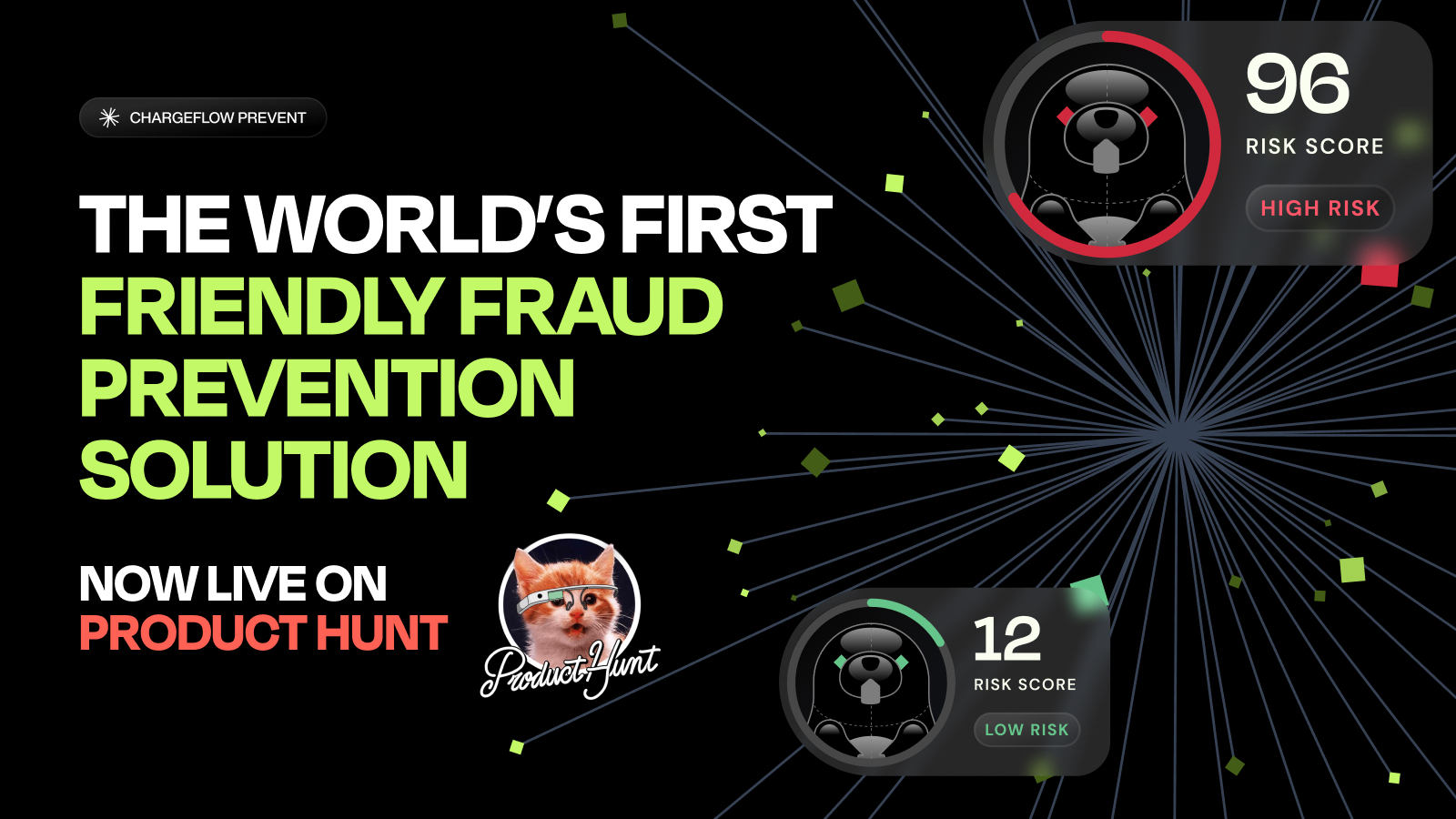
Chargeflow's app on the Shopify App Store provides a more excellent and holistic strategy for managing fraudulent transactions. The automated chargeback solution leverages advanced fraud filtering and identification systems to ensure you don't process transactions that eventually cost you more money.
The app serves as your powerful, ruthless, and reliable linebacker in safeguarding your store from various fraud cases, including bots, chargebacks, fake accounts, payments, phishing, and so on. Unlike a static blocklist, Prevent scores every order, so it catches bad actors you haven't seen before, not just the ones already on your list.
Hoe Chargeflow verkopers op Shopify tegen fraude beschermt
Chargeflow is a chargeback and dispute automation solution for eCommerce. It helps eCommerce companies manage disputes and recover lost revenue from fraud perps by automating workflows, providing insights into chargeback reason codes, and disputing chargebacks on autopilot.
Stap 1: Installatie en integratie
Onboarding Chargeflow’s native Shopify app requires no complicated process. After you’ve installed the app from Shopify App Store, the rest is a breeze:
- Naadloze integratie in twee klikken, zonder dat er programmeerwerk nodig is.
- The app fully integrates with major payment service provider options like Shopify Payments, PayPal, Payflow, Stripe, and Braintree, with other integrations in progress. See what data we extract from your system for fraud prevention.
- Zorg ervoor dat uw medewerkers over de juiste machtigingen beschikken om Chargeflow toegang te krijgen tot Chargeflow . Deze machtigingen omvatten:
- Bestellingen
- Klanten
- Apps en kanaalrechten - Specifieke apps en verkoopkanalen - Chargeflow.
Stap 2: Benchmarking voor casemanagement
Chargeflow securely fetches new disputes and chargebacks in real time from your connected payment processors. This data goes into calculating your ChargeScore®, Chargeflow’s proprietary algorithm for dispute success rate.

Stap 3: Geautomatiseerde reactie op geschillen
Chargeflow automates the response process by generating tailored dispute responses based on the chargeback reason code and extended order insights. This response creation is facilitated by a proprietary framework called ChargeResponse. How ChargeResponse works:
- It links the dispute to its corresponding order data from the merchant’s eCommerce platform.
- It understands the company’s background and the chargeback reason after analyzing the company's expertise and the dispute reason.
- It uses 50+ data points, data enrichment systems, and several other aggregates to cross-reference relevant data.
- It analyzes the merchant’s policies and terms and provides the right sections that support the compelling evidence and improve its winning chances.
- Most importantly, the unique and powerful Machine Learning Algorithm keeps learning from your processes to maximize outcomes.
Your account's Dispute Expert double-checks the dispute response before our systems send it to the bank to ensure the best outcome. The result is usually a 75% average dispute win rate, unlike the industry’s average of ~12%!
Chargeflow ook aanvullende diensten toegevoegd, zoals Chargeflow en Chargeflow , om handelaren te helpen bij het aanpakken van betalingsfraude.
Chargeback prevention alerts notify you of incoming disputes, so you can preemptively stop them. Chargeflow Insights enables businesses to dive deep into their data and uncover actionable insights. It gives you a 360-degree view of your post-transaction data.
{{cta}}
Blocking a Future Order Is Not the Same as Winning a Dispute
Merchants often assume that once a fraudulent customer is on the blocklist, the problem is handled. It isn't, and the distinction matters for how you spend your time.
Blocking, whether through Fraud Control rules, Shopify Flow, or Chargeflow Prevent, only stops that identity from completing a new order. It does nothing for a charge that customer already placed and is now disputing with their bank. A chargeback is a separate process that runs through the card network, not through your Shopify admin, so blocking the customer's email the same afternoon they file a dispute will not make that dispute go away. You still have to respond to the bank with evidence before the deadline, regardless of whether the customer is blocked going forward.
This split also explains why blocklists alone don't fix friendly fraud. A customer who genuinely received the order but disputes the charge anyway isn't stopped by a better blocklist; they're stopped by compelling evidence in the dispute response. Treat blocking and dispute response as two separate workflows that happen to share the same list of bad actors.
What Actually Makes a Blocklist Entry Effective
BriBri's question above, "how do I block their name," points to the most common mistake: building a blocklist around identifiers that are trivial to change. A name typed into a checkout field isn't verified against anything, so a blocked customer can place their next order as "Jon Smyth" instead of "John Smith" without any extra effort. The table below ranks common blocklist data points by how hard they are for a repeat fraudster to fake or rotate.
| Blocklist Data Point | How Easily a Fraudster Can Change It | Effective Used Alone? |
|---|---|---|
| Customer name | Trivial; free text, never verified | Nee |
| Email address | Easy; free email accounts are unlimited | Weak on its own |
| Phone number | Moderate; burner and VoIP numbers still work | Matig |
| Shipping or billing address | Moderate; freight forwarders and relatives' addresses bypass it | Matig |
| IP-adres | Easy; VPNs and mobile networks rotate IPs constantly | Weak on its own |
| Apparaat-vingerafdruk | Hard; tied to physical hardware and browser configuration | Strongest single signal |
The practical takeaway: a rule built on a single identifier, especially name or email alone, is easy to route around. Combine at least two or three of these signals in your Fraud Control or Flow rules, and let a risk-scoring layer like Chargeflow Prevent catch the device- and behavior-level matches that a manual blocklist can't encode.
One more wrinkle worth planning for: fraud is no longer only a human problem. As AI shopping agents start placing orders on a customer's behalf, a blocklist built around one person's typing habits or browser fingerprint may not catch the agent acting on their instructions. Merchants who sell through AI-mediated checkout should get ahead of AI agent chargeback liability questions and review the evidence requirements in this agentic commerce chargebacks playbook before it becomes a live dispute problem.
Een vergelijking van je blokkeeropties op Shopify
| Methode | Blokken vóór de kassa? | Het meest geschikt voor | Beperkingen |
|---|---|---|---|
| Fraud Control checkout rules | Yes, native | Known repeat offenders by email, address, or IP | Static rules; requires Shopify Payments; offenders can rotate identities |
| Shopify Stroom- en fraudeanalyse | No, auto-cancels after | Tagging, alerts, and cancel/restock workflows | Order is placed first, then canceled; static rules |
| Third-party IP/address blocking apps | Yes, page-level blocks | Blocking known regions or address patterns | VPN’s en nieuwe identiteiten omzeilen statische blokkades |
| Chargeflow Voorkomen | Na het afrekenen, vóór de afhandeling | Onbekende fraudeurs opsporen via risicoscores | Te doen na de poging tot bestelling, voordat je het pakket verstuurt |
Veelgestelde vragen over het blokkeren van klanten op Shopify
Kun je een klant blokkeren op Shopify?
There's no "block customer" button on a customer's profile, but Shopify's Fraud Control app can block a checkout by email, address, or IP before it ever becomes an order. You can also use Shopify Flow to auto-cancel orders matching a blocklist, install a third-party blocking app for extra IP-level blocks, or use Chargeflow Prevent to automatically stop risky orders before fulfillment.
Hoe kan ik voorkomen dat iemand een bestelling plaatst in mijn Shopify -winkel?
Go to Apps > Fraud Control in your Shopify admin, click Rules, then Create rule, and add a filter for the customer's email, address, or IP. That checkout will be blocked before it becomes an order. For after-the-fact cancellation instead, create a Shopify Flow workflow with the "Order risk analyzed" trigger, add matching conditions, and set the action to cancel the order automatically.
Heeft Shopify nog steeds de Fraud Filter-app?
No. Shopify retired the Fraud Filter app on January 31, 2025. Blocklist logic that used to live in Fraud Filter now belongs in the Fraud Control app's checkout rules (for pre-checkout blocks) and Shopify Flow (for post-checkout automation, including risk-level conditions).
Hoe kan ik frauduleuze bestellingen op Shopify voorkomen?
Combine three layers: Fraud Control checkout rules to block known bad actors before checkout, Shopify Flow with fraud analysis to auto-cancel anything that slips through, and a risk-scoring tool like Chargeflow Prevent to catch new fraudsters your blocklist has never seen. Chargeflow Alerts and Automation then prevent and recover the chargebacks that slip through.
Kan ik een IP-adres blokkeren op Shopify?
Yes. Fraud Control's checkout rules support IP address filters natively, so you can block a checkout from a specific IP before it becomes an order, no third-party app required. Keep in mind fraudsters switch IPs easily with VPNs and mobile networks, which is why pairing IP rules with email and address filters, or with signal-based risk scoring, catches more repeat fraud than IP blocks alone.
Does blocking a customer cancel their existing chargeback?
No. Blocking only stops that identity from placing a new order. A chargeback on an order that was already placed has to be answered directly with the card network, with evidence submitted before the bank's deadline, regardless of whether you've since blocked the customer.
Layering Shopify's Tools with Chargeback Protection
Managing fraud is an increasing concern for eCommerce merchants, and the fraud landscape is constantly shifting. Effective fraud mitigation demands proactive measures and usually involves multiple strategies working together, not one setting you flip once. Fraud Control rules stop known bad actors before checkout, Flow cleans up what slips through, and neither one touches a dispute that's already been filed.
Several Shopify merchants have found success pairing Shopify's built-in tools with Chargeflow's automated chargeback solution. Chargeflow ensures that false and fraudulent transactions don't come back to hurt your balance sheet, and when a dispute does land despite your blocklists, you can respond to it on autopilot instead of losing the revenue by default. Chargeflow's success-based pricing means you pay only for won cases. Here's how to get started.
Chargebacks terugwinnen op Shopify, automatisch
Chargeflow wordt rechtstreeks geïntegreerd met je Shopify -winkel om chargebacks en geschillen voor je op te lossen, zonder dat je daar iets handmatig voor hoeft te doen.
Chargebacks?
Dat is niet langer jouw probleem.
Haal 4x meer chargebacks terug en voorkom tot 90% van de inkomende betalingen, dankzij AI en een wereldwijd netwerk van 20.000 handelaren.


.png)
.webp)
.webp)
.webp)