

















%201.svg)






























Contestações no PayPal: como contestar uma reclamação e resolvê-la

Estornos?
Não são mais um problema para você.
Recupere 4 vezes mais estornos e evite até 90% dos estornos recebidos, com o apoio da IA e de uma rede global de 20.000 comerciantes.


 Mais de 600 avaliações
As disputas no PayPal começam com um prazo de negociação de 20 dias entre você e o comprador. Se não forem resolvidas, elas se transformam em reclamações, nas quais o PayPal decide o desfecho com base nas evidências apresentadas por você. O não cumprimento de prazos ou o envio de documentação insuficiente costuma resultar em perdas automáticas, cobrança de taxas e taxas de disputa mais elevadas. O segredo para vencer é a rapidez, evidências bem estruturadas e a compreensão de como as disputas diferem dos estornos. À medida que o volume cresce, o tratamento manual se torna ineficiente. A automação e a documentação adequada são agora essenciais para manter as taxas de sucesso e proteger sua conta do PayPal contra riscos a longo prazo.
- Os compradores podem abrir uma contestação no PayPal até 180 dias após o pagamento original.
- Assim que uma disputa é aberta, os vendedores têm um prazo de 20 dias para resolvê-la diretamente com o comprador antes que o PayPal intervenha por meio de uma reclamação formal.
- As reclamações encaminhadas para análise são normalmente decididas no prazo de 30 dias, e os vendedores devem apresentar as provas no prazo de 10 dias a partir da data em que a reclamação foi apresentada.
- Os vendedores que não contestam ativamente as contestações perdem de 60% a 80% dos casos; uma resposta rápida e fundamentada em evidências muda essas probabilidades.
- As taxas de contestação do PayPal variam de acordo com sua taxa de contestação: ao ultrapassar 1,5% com mais de 100 transações, você passa para a faixa de taxas de contestação de alto volume, que tem custo mais elevado.
Uma contestação no PayPal é uma reclamação iniciada pelo comprador e apresentada por meio da Central de Resolução do PayPal em relação a um item que não foi recebido ou que não correspondia à descrição — trata-se de um procedimento distinto do estorno da rede de cartões; no entanto, os compradores podem recorrer ao próprio banco em vez de, ou após, utilizar o processo do PayPal.
| Palco | Quem atua | Prazo típico | Opções para comerciantes |
|---|---|---|---|
| Contestação aberta | Arquivos do comprador na Central de Resoluções | No prazo de 180 dias a partir do pagamento | Responda com o número de rastreamento, o reembolso ou o comprovante de entrega |
| Encaminhamento para reclamação | O comprador encaminha a disputa não resolvida para uma instância superior | 20 dias após o início da contestação | Apresente as provas finais antes que o PayPal tome uma decisão |
| Avaliação do PayPal | Equipe de suporte do PayPal | Até 30 dias | Não há necessidade de tomar outras medidas uma vez que o caso esteja em análise |
| Resolução | PayPal | Varia | Valores liberados para o comerciante ou reembolsados ao comprador |
As contestações do PayPal são inevitáveis no comércio eletrônico. Se você vender online por tempo suficiente, certamente vai se deparar com elas.
Os compradores abrem uma disputa no PayPal para buscar uma solução quando algo dá errado em uma transação. Esses casos podem ser resolvidos com uma comunicação oportuna e um excelente atendimento ao cliente. No entanto, se você perder essa oportunidade e o comprador avançar para uma reclamação, a conversa chega ao fim e o processo formal se inicia. O PayPal intervém, não como mediador, mas como juiz. O resultado é então decidido com base na solidez das suas provas e na sua capacidade de seguir as regras da plataforma para a resolução de reclamações.
É por isso que a forma como você responde às contestações do PayPal é de vital importância. Uma defesa sólida e bem estruturada determina se os fundos permanecerão na sua conta ou serão devolvidos permanentemente ao comprador, além de possíveis taxas de contestação e prejuízos às métricas da sua conta.
Este guia apresenta os passos exatos para responder e gerenciar disputas do PayPal como um especialista experiente em fraudes. Após ler este artigo, você poderá resolver reclamações a seu favor, proteger sua receita e manter sua conta de vendedor em boa situação.
O que é uma contestação no PayPal?
O próprio PayPal atua como prestador de serviços de pagamento do comerciante nesse fluxo; é por isso que as contestações são encaminhadas e resolvidas dentro do próprio sistema do PayPal, em vez de por meio de um processador independente.
Uma contestação no PayPal é um processo interno do PayPal que ajuda os titulares de cartões a resolver problemas relacionados a transações por meio da abertura de um caso no PayPal. Esse mecanismo é acionado no momento em que um comprador abre um caso no Centro de Resolução do PayPal.
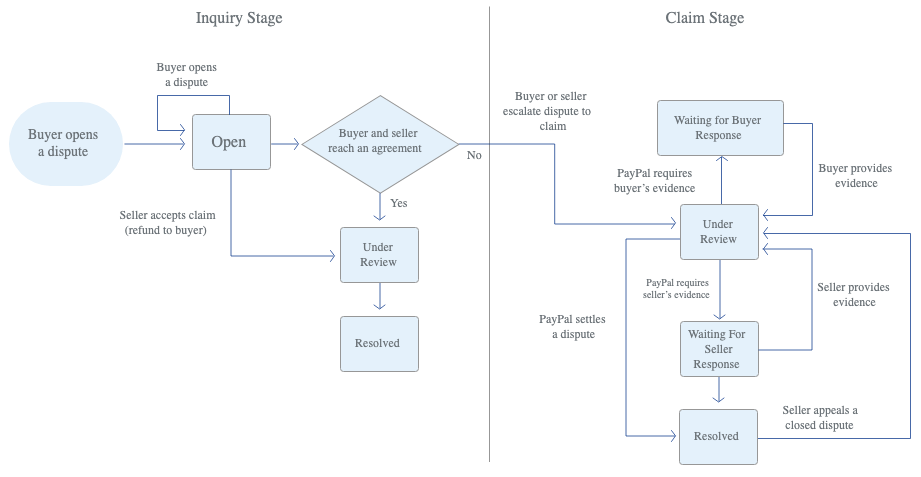
O PayPal concebeu o processo interno de resolução de disputas com uma fase de negociação integrada, estruturada em duas etapas.
Fase 1: A contestação (prazo de 20 dias)
Esta primeira etapa consiste em uma comunicação direta entre comprador e vendedor dentro do Centro de Resolução. O PayPal não se envolve diretamente, e não há decisão arbitral, cobrança automática de taxas nem estorno de fundos, a menos que você autorize.
Durante esse prazo, você pode oferecer reembolsos, substituições ou provas que tornem a contestação desnecessária. No entanto, se você não tomar nenhuma providência dentro do prazo de contestação, o caso poderá ser encaminhado automaticamente para a próxima etapa, e você não poderá mais revertê-lo.
Fase 2: A reclamação (o PayPal resolve o problema)
Quando uma disputa se transforma em uma reclamação — o que pode ser iniciado por qualquer uma das partes —, o PayPal assume o papel de árbitro, e o resultado será determinado pelas provas apresentadas. Normalmente, a decisão é tomada em até 14 dias (às vezes, pode levar mais de 30 dias). E é nesse momento que a maioria dos vendedores perde dinheiro, incorre em taxas e, em casos extremos, perde o direito de processar pagamentos.
Veja abaixo um exemplo de contestação e reclamação no PayPal:
📍Observação: os estornos do PayPal (contestações que os titulares de cartão apresentam diretamente por meio de seus bancos ou emissores de cartão de crédito, em vez de pelo Centro de Resolução do PayPal) seguem um processo ligeiramente diferente. Nesses casos, a decisão final cabe ao emissor do cartão (e não ao PayPal).
Como contestar uma cobrança do PayPal
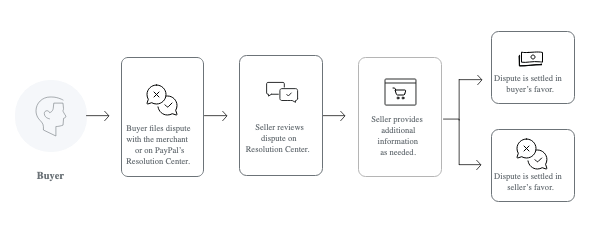
Antes de poder se defender de uma contestação de forma eficaz, você precisa se perguntar o mesmo que os compradores perguntam e entender exatamente como funciona o processo de contestação. Por quê? Porque as contestações são uma ferramenta de proteção ao consumidor. O PayPal, assim como outros processadores de pagamentos, torna o processo de abertura de contestação deliberadamente simples para os clientes. É tão simples que a maioria dos compradores o conclui em menos de um minuto, sem nunca entrar em contato com você, o comerciante.
Este é o fluxo exato que eles seguem:
Na internet (a forma mais comum)
- O comprador faz login no PayPal e acessa a Central de Resolução de Disputas (link direto: paypal.com/disputes);
- Clique em “Relatar um problema”, selecione a transação a ser contestada e clique em “Continuar”;
- Escolha o motivo da contestação, que, no caso do comércio eletrônico, geralmente se enquadra em uma destas duas opções:
- Item não recebido (INR)
- Significativamente diferente da descrição (SNAD)
- Responde às perguntas orientadas 2 e 3, adiciona fotos ou detalhes e envia.
No aplicativo móvel
- Eles tocam em “Atividade”.
- Toque na transação específica.
- Role a página para baixo e toque em “Relatar um problema”.
- Siga o mesmo assistente rápido e envie.
Assim que eles abrirem a reclamação, você receberá um e-mail e uma notificação do Centro de Resolução do PayPal. O prazo começa a correr imediatamente. O PayPal costuma bloquear temporariamente os fundos durante essa fase.
Contestações do PayPal x Estornos: Principais diferenças
Distinguir antecipadamente uma disputa legítima de uma fraude é exatamente o objetivo de uma estratégia mais abrangente de prevenção de fraudes no comércio eletrônico, em vez de reagir apenas depois que o PayPal abre um caso.
As contestações e os estornos do PayPal podem parecer sinônimos do mesmo problema, pois ambos decorrem da insatisfação do comprador e podem resultar na reversão da transação. Mas, na prática, eles são significativamente diferentes.
Quando um comprador abre uma contestação no PayPal, todo o processo ocorre dentro da plataforma. Você tem um canal direto de comunicação com o comprador, um prazo de 20 dias para resolver a questão e, caso as negociações fracassem, o PayPal intervém como árbitro. Mesmo na fase de contestação, você está lidando com um sistema que possui muito mais informações e controle sobre a transação.
Os estornos do PayPal são um caso totalmente diferente. O comprador ignora completamente o PayPal e recorre diretamente à administradora do cartão. A partir daí, o PayPal é pouco mais do que um intermediário. Ele não tem influência direta sobre o resultado. A administradora do cartão conduz sua própria investigação em seu próprio prazo, que geralmente chega a 120 dias, e sua decisão é definitiva.
Para os comerciantes, essa diferença é fundamental. Uma contestação é um diálogo. Um estorno é um veredicto no qual você teve muito pouca influência. A tabela abaixo esclarece melhor a diferença entre contestações e estornos:
| Aspecto | Controvérsia | Estorno |
|---|---|---|
| Iniciado por | Comprador, via PayPal | O comprador, por meio da administradora do cartão |
| Onde é tratado | Por dentro do Centro de Resolução do PayPal | Fora do PayPal, no âmbito do banco emissor |
| O papel do PayPal | Mediador e responsável pela decisão final | Apenas transmissão de informações; sem controle sobre o resultado |
| Envolvimento dos comerciantes | Comunicação direta e negociação com o comprador | Envie os comprovantes pelo PayPal, que os encaminhará ao emissor |
| Janela de resolução | Normalmente, 20 dias antes da transformação em reclamação | Até 120 dias, dependendo das regras da rede do cartão |
| Cadeia de escalonamento | Contestação → Reclamação (o PayPal analisa e decide) | Estorno → Reclamação → Pré-arbitragem → Arbitragem (controlada pelo emissor/rede) |
| Controle do comerciante | Além disso, os resultados podem ser influenciados por meio da comunicação e de dados concretos | Em última instância, a decisão final cabe ao banco emissor |
| Impacto nos fundos | Os fundos ficam retidos temporariamente até que a disputa seja resolvida | Os fundos são imediatamente estornados, enquanto se aguarda a investigação |
Prazos para contestação no PayPal e possíveis resultados
Para transações financiadas pela Visa e processadas pelo PayPal, esse cronograma também influencia a classificação do comerciante no âmbito do Programa de Monitoramento de Adquirentes da Visa, que acompanha os índices independentemente do próprio processo de contestação do PayPal.
O prazo de resposta é a única variável que você não pode ignorar quando uma contestação chega à sua Central de Resolução. Se você não cumprir o prazo, o caso será decidido sem a sua participação.
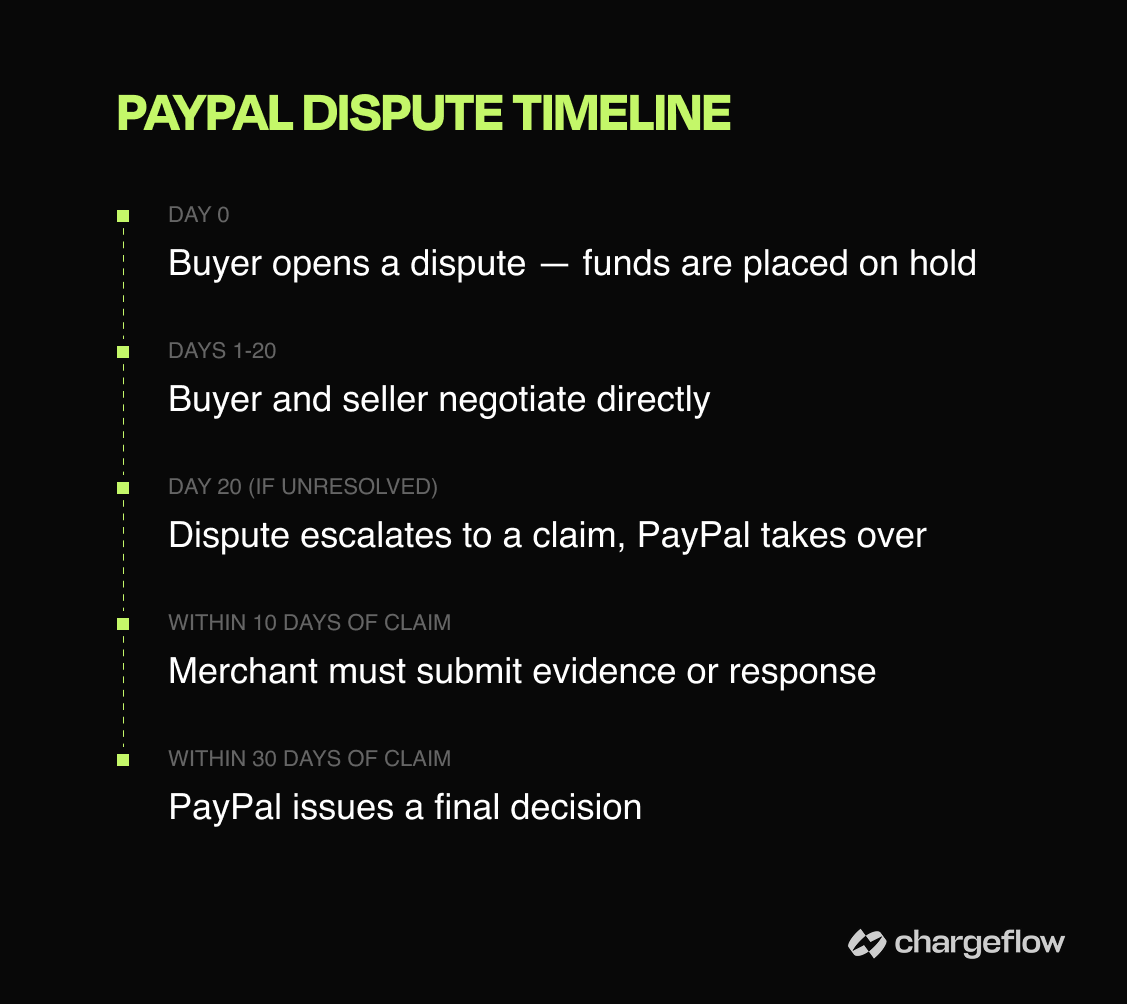
Para os compradores, o prazo começa a contar a partir do momento do pagamento. O comprador tem 180 dias para abrir uma contestação, ou seja, cerca de seis meses após a conclusão da transação. Esse é um prazo bastante amplo, o que significa que uma transação que você considera encerrada há muito tempo ainda pode ser reaberta.
Assim que uma contestação for aberta, você, o comerciante, tem 20 dias para chegar a um acordo satisfatório com o comprador. Essa é sua melhor oportunidade de resolver a situação de forma amigável, seja por meio de um reembolso, uma substituição ou uma explicação que satisfaça o comprador, antes que o PayPal se envolva.
Se a disputa evoluir para uma reclamação, o PayPal intervém e, normalmente, resolve a questão em até 30 dias. Nessa fase, você precisará apresentar provas convincentes, geralmente no prazo de 10 dias a partir da data em que a reclamação foi apresentada. O silêncio é interpretado como uma admissão.
No fim das contas, um litígio é encerrado de uma das três seguintes maneiras:
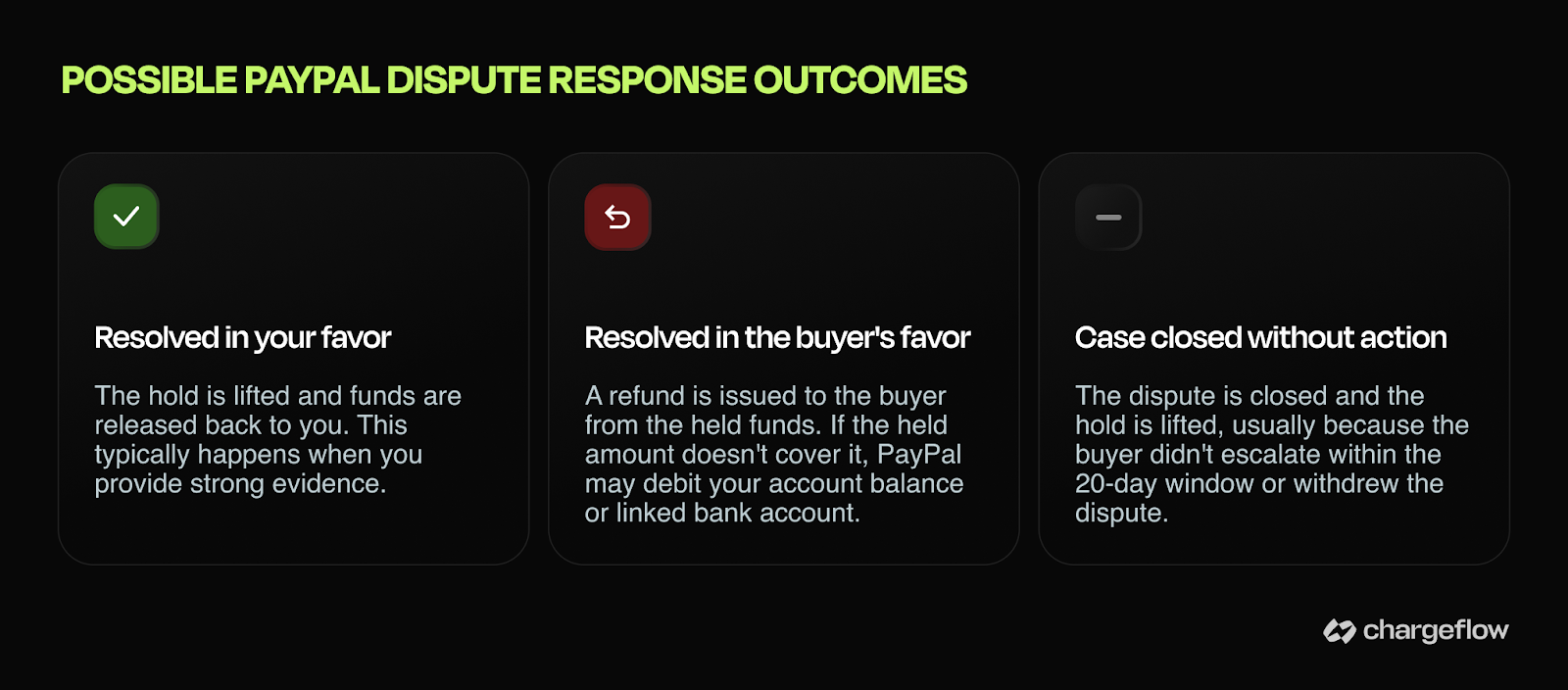
O resultado que mais importa para você, como comerciante, é o primeiro, e conseguir alcançá-lo de forma consistente depende da eficácia com que você responde às reclamações.
Como responder a uma contestação no PayPal
Responder a uma contestação significa, acima de tudo, apresentar as provas certas, de forma adequada, antes que o prazo expire. No entanto, a maioria dos vendedores trata o Centro de Resolução como se fosse um ticket de suporte. Eles respondem uma vez, anexam um número de rastreamento e torcem para que tudo dê certo.
Essa abordagem resulta em uma perda de 60% a 80% dos casos. Comerciantes experientes, aqueles que vencem a maioria das disputas que enfrentam, tratam cada disputa como se fosse um julgamento. Eles respondem dentro do prazo, montam um conjunto de provas irrefutáveis e utilizam todos os meios disponíveis para inclinar a balança a seu favor.
Aqui está o manual exato para vencer os processos:
1) Responda em até 24 horas. Não porque o PayPal exija isso, mas porque uma resposta rápida transmite credibilidade. Respostas demoradas parecem evasivas e, se o comprador escalar o caso antes de você responder, você já terá perdido terreno.
2) Saiba o que significa “escalonamento”. Assim que uma contestação se transformar em reclamação, você terá 10 dias para enviar sua resposta. Perder esse prazo significa uma derrota definitiva por falta de resposta. Trate cada contestação em aberto como um prazo a cumprir.
3) Adapte suas provas ao tipo de contestação. Uma resposta rápida só é eficaz se suas provas forem relevantes para o caso. É nesse ponto que a maioria dos comerciantes comete erros. Eles enviam tudo o que têm e esperam que algo seja aceito. O sistema de análise do PayPal não lê toda a sua conversa. Ele verifica se os documentos estão completos e se as provas são pertinentes. Por exemplo, começar com fotos do produto, a descrição do anúncio e a comunicação pré-envio, mostrando onde o comprador confirmou o pedido, pode ajudar a influenciar o julgamento em casos de “Significativamente diferente da descrição”.
4) Controle o rumo da narrativa na sua resposta. Seja objetivo, sequencial e conciso. Escreva como se estivesse informando alguém (neste caso, um algoritmo de computador) que não sabe nada sobre a transação, pois é exatamente isso que você está fazendo. Evite linguagem defensiva ou explicações prolixas. Indique o que aconteceu, o que você enviou e quando, e deixe que a documentação faça o resto.
5) Use o sistema de mensagens de forma estratégica. Antes que uma disputa se transforme em uma reclamação, você tem contato direto com o comprador. Um reembolso parcial, uma substituição ou até mesmo um reconhecimento sincero podem resolver uma disputa mais rapidamente do que qualquer envio de provas.
6) Documente tudo antes que seja necessário. Quando surgir uma disputa, já será tarde demais para montar seu caso do zero. Confirmações de entrega, correspondências relacionadas aos pedidos, fotos dos produtos: tudo isso deve ser arquivado como parte da rotina, e não procurado às pressas depois que o problema já tiver surgido.
Essas são medidas concretas e eficazes. E funcionam muito bem quando se lida com compradores honestos e bem-intencionados.
Mas a verdade é que a maioria das contestações no PayPal hoje em dia não são casos genuínos. Trata-se de fraudes amigáveis.
E mesmo quando a reclamação é legítima, à medida que o volume de pedidos aumenta, o tratamento manual torna-se insustentável. De repente, você se vê sobrecarregado por respostas repetitivas, evidências dispersas, prazos não cumpridos e taxas de contestação crescentes que, silenciosamente, corroem suas margens de lucro. É por isso que os comerciantes mais experientes já não lidam com contestações manualmente.
A verdade pouco comum que a maioria dos vendedores precisa ouvir
De acordo com o Relatório sobre o Estado dos Estornos de 2025 da Mastercard, as instituições financeiras (IFs) utilizam atualmente sistemas automatizados para analisar as contestações quanto à integridade estrutural, consistência e qualidade dos dados, muitas vezes tomando decisões sem a intervenção humana.
A consequência prática para os comerciantes é que a abordagem antiga para responder a contestações já não passa pelo filtro inicial. Por quê? Os sistemas automatizados não estão lendo sua explicação. Eles estão comparando padrões com os campos de evidência esperados para um determinado código de motivo. Essa mudança estrutural exige uma adaptação correspondente da sua parte. Para começar, você deve agora incorporar a qualidade das evidências às operações diárias e usar o mesmo sistema automatizado que as instituições financeiras utilizam para responder aos casos de forma automática.
É aí que uma plataforma como Chargeflow entra em cena. Chargeflow se destacado consistentemente no setor por automatizar todo o processo de contestação. Ela estáintegrada ao PayPal, o que significa que você pode resolver o problema da contestação do início ao fim.
Veja o que acontece quando você vincula sua conta do PayPal ao Chargeflow:
- A IA analisa instantaneamente cada nova contestação utilizando vários dados do histórico do seu pedido e do comprador
- Você é notificado sobre um conflito iminente, antes mesmo que ele chegue a um ponto crítico
- Caso opte por não reembolsar a transação, o sistema redigirá e enviará uma resposta profissional adaptada às suas políticas específicas de envio e reembolso
- O sistema encaminha automaticamente as disputas não respondidas e apresenta recursos com provas complementares nos casos perdidos (aumentando a taxa de sucesso em até 30%)
- Você conta com uma resolução totalmente automatizada, desde a consulta até a reclamação e o recurso
- O painel em tempo real mostra as taxas de sucesso, a economia em taxas e os padrões de fraude
Chega de acessar a Central de Resoluções às 23h. Chega de ficar na dúvida sobre quais provas o PayPal realmente aceita. Agora, só taxas de recuperação mais altas e seu tempo de volta.
Quando uma contestação no PayPal se transforma em um estorno
A Mastercard também aplica seus próprios limites específicos neste caso, e os comerciantes que os ultrapassarem podem ser inscritos no programa de monitoramento de estornos da Mastercard, independentemente de como a contestação original tenha sido aberta pelo PayPal.
Nem todas as disputas são resolvidas internamente pelo PayPal.
Se o comprador ficar impaciente, discordar da decisão do PayPal ou simplesmente quiser tentar novamente, ele pode solicitar um estorno bancário. Nesse momento, o PayPal se retira do processo. A rede do cartão passa a ser quem toma a decisão, e as regras podem virar contra você.
Isso gera três realidades difíceis que a maioria dos vendedores nem sempre consegue prever:
- Você pode acabar tendo que contestar a mesma transação duas vezes: uma vez no Centro de Resolução do PayPal e outra vez pelo banco.
- Os estornos têm prazos de apresentação mais longos (até 120 dias) e critérios de comprovação mais rigorosos.
- Mesmo que você tenha vencido a disputa inicial, o banco costuma partir de uma posição favorável ao comprador. E eles podem até mesmo solicitar um segundo estorno.
A verdade é que um reembolso rápido em um caso legítimo dentro do prazo de 20 dias quase sempre sai mais barato do que o custo total da taxa de estorno, da reputação prejudicada e das horas gastas em um caso que você não controla.
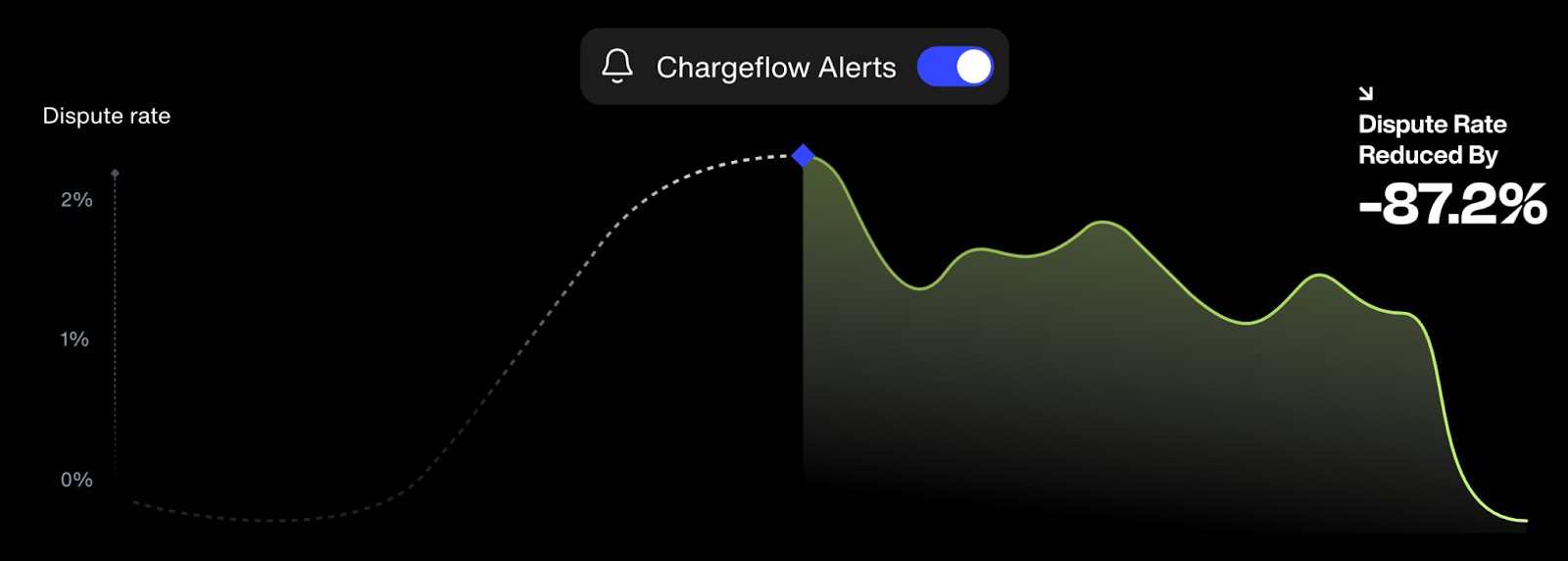
É por isso que os comerciantes corporativos estão utilizando ferramentas como Chargeflow e o alerta de estorno para antecipar-se a casos envolvendo agentes mal-intencionados e reembolsar automaticamente os casos legítimos.
O que é a taxa de contestação do PayPal?
As taxas de contestação do PayPal são cobranças que o PayPal aplica aos vendedores por cada contestação ou estorno que eles enfrentam, seja por meio do Centro de Resolução formal ou de um processo bancário.
Essas taxas se aplicam a qualquer transação paga por meio da conta do PayPal do comprador ou do PayPal Guest Checkout.
Exceções importantes
O PayPal não cobra taxas de contestação sobre transações com cartões “sem marca” processadas pelo PayPal Pro ou pelo Advanced Checkout.
A taxa de contestação cobrada é baseada no desempenho e calcula-se com base na sua atividade nos últimos três meses completos. Aqui estão os detalhes:
- A Taxa Padrão de Litígio se aplica à maioria dos vendedores.
- A taxa por volume elevado de contestações (significativamente mais alta do que as taxas padrão) é aplicada automaticamente se a sua taxa de contestações atingir 1,5% ou mais e você tiver processado mais de 100 transações de venda nesse período.
Isenções (apenas taxa padrão)
O PayPal não cobra taxas de contestação nos seguintes casos:
- Reclamações que nunca chegam a se tornar uma reclamação formal.
- As disputas devem ser resolvidas diretamente e de forma amigável com o comprador.
- Transações não autorizadas registradas diretamente no PayPal.
Como a taxa varia de acordo com a sua taxa de disputas, cada reclamação que poderia ter sido evitada aumenta discretamente seus custos em todas as áreas. É exatamente por isso que uma ferramenta automatizada de defesa contra estornos, como Chargeflow , se paga Chargeflow .
| Cenário | Resultado da taxa |
|---|---|
| Taxa padrão de contestação | Aplica-se à maioria dos vendedores; calculado com base na sua atividade de contestação nos últimos três meses completos |
| Taxa para disputas de alto volume | Substitui automaticamente a taxa padrão assim que sua taxa de contestação atingir 1,5% ou mais em mais de 100 transações no período; valor significativamente superior à taxa padrão |
| A consulta foi resolvida antes de se tornar uma reclamação | Sem taxa de contestação |
| Controvérsia resolvida diretamente com o comprador | Sem taxa de contestação |
| Transação não autorizada registrada diretamente no PayPal | Sem taxa de contestação |
| Transações com cartões “sem marca” via PayPal Pro/Advanced Checkout | Não há cobrança de taxa de contestação |
Como posso verificar o andamento da minha contestação ou reclamação?
Você pode acompanhar qualquer contestação ou reclamação 24 horas por dia, 7 dias por semana, diretamente no Centro de Resolução do PayPal.
- Enquanto o caso ainda estiver em fase de disputa, você pode enviar uma mensagem ao comprador e fornecer quaisquer informações adicionais que possam ajudá-lo a encerrar o caso.
- Depois que o caso for encaminhado para uma reclamação, clique em “Exibir” para ver o status atual e a data prevista para a resolução.
- Para ter uma visão geral de tudo, acesse “Casos em aberto”.
- Para casos mais antigos, acesse a seção “Casos encerrados” e clique no ID do caso para ver todos os detalhes.
Se a transação não aparecer na Central de Resoluções (geralmente porque o comprador solicitou um estorno diretamente ao seu banco), você precisará entrar em contato com o suporte do PayPal.
Com Chargeflow, é ainda mais simples.
Chega de ter que acessar a Central de Resolução do PayPal ou ficar procurando por IDs de caso.
Todas as disputas e estornos relacionados à sua conta aparecem instantaneamente no seu Chargeflow , com atualizações de status em tempo real, alertas automáticos e uma linha do tempo clara que mostra exatamente em que estágio cada caso se encontra, desde a consulta até a reclamação e a resolução final.
Você sempre saberá o que foi rejeitado, está em aberto, foi aprovado, foi recusado e o que precisa da sua atenção, tudo em uma interface simples e organizada. Sem logins extras nem notificações perdidas.
Considerações finais sobre disputas no PayPal
Também vale a pena acompanhar como se desenvolve a questão da responsabilidade por estornos envolvendo agentes de IA, já que os agentes de compras automatizados acabarão precisando de suas próprias regras para o tratamento de disputas no PayPal.
Todos os relatórios sobre tendências de disputas apontam para a mesma conclusão: quanto mais tempo você vender online, mais disputas enfrentará. Algumas são legítimas. Muitas não são. O que diferencia os comerciantes que mantêm a lucratividade daqueles que, discretamente, perdem seus privilégios de processamento não é a sorte, mas a forma sistemática como respondem aos casos.
O prazo de 20 dias concedido pelo PayPal pode parecer generoso até você ter que lidar com vários casos em andamento ao mesmo tempo, cada um em uma fase diferente e exigindo provas distintas. Compilar respostas manualmente e correr contra prazos deixa de ser um processo e passa a ser um problema. Além disso, o código de motivo atribuído pode não refletir a intenção do comprador, de modo que cada prova enviada pode ser inútil, já que se refere à causa errada.
Esse é o problema Chargeflow criado para eliminar. Ele se conecta diretamente à sua conta do PayPal, usa IA para analisar cada caso e gera automaticamente respostas otimizadas para vencer, não apenas para responder. Alertas, prevenção de disputas, escalonamentos, recursos, acompanhamento de prazos? Tudo isso é tratado. O que você ganha em troca é um único painel de controle, um índice de disputas mais saudável e as horas que você gastava com casos que nem deveria estar lidando desde o início.
Os conflitos vão continuar surgindo. Isso não muda. O que pode mudar é a quantidade de tempo, dinheiro e energia que eles consomem.
Perguntas frequentes
O que é o Centro de Resolução?
O Centro de Resolução é a ferramenta integrada do PayPal que permite que compradores e vendedores abram, respondam e acompanhem disputas e reclamações sem envolver um banco ou uma rede de cartões.
Qual é a diferença entre uma contestação e uma reclamação?
Uma disputa é a etapa inicial e informal em que o comprador e o vendedor podem resolver uma questão diretamente; uma reclamação é a etapa em que o caso é encaminhado para uma instância superior, na qual o PayPal intervém para analisar as provas e emitir uma decisão vinculativa.
Um comerciante pode vencer uma contestação no PayPal?
Sim — os vendedores que respondem rapidamente com números de rastreamento válidos, confirmação de entrega ou comprovante de que o item corresponde à descrição costumam vencer as disputas e reclamações no PayPal.
Quanto tempo levam as contestações do PayPal?
A maioria das disputas é resolvida dentro do prazo de 20 dias, caso você chegue a um acordo diretamente com o comprador. Se o caso evoluir para uma reclamação, o PayPal geralmente toma uma decisão em até 30 dias, desde que você apresente as provas dentro do prazo exigido de 10 dias.
Qual é o prazo para abrir uma contestação no PayPal?
Os compradores têm até 180 dias a partir da data do pagamento para abrir uma contestação no Centro de Resolução.
O que acontece se um vendedor não responder a uma contestação no PayPal?
O silêncio é considerado uma concessão. Se você não responder dentro do prazo previsto para a contestação, o caso poderá ser encaminhado automaticamente para a instância superior e você perderá a possibilidade de reverter o resultado.
O PayPal cobra alguma taxa por disputas?
Sim. O PayPal cobra uma Taxa Padrão de Contestação na maioria das contestações e reclamações, com base na sua atividade de contestação nos últimos três meses. Vendedores com uma taxa de contestação de 1,5% ou mais em mais de 100 transações passam para a faixa de Taxa de Contestação para Alto Volume, que é significativamente mais alta. As taxas são isentas em casos de consultas que nunca chegam a ser encaminhadas, contestações resolvidas diretamente com o comprador e reclamações por transações não autorizadas apresentadas diretamente ao PayPal.
Qual é a diferença entre uma contestação no PayPal e um estorno de cartão de crédito?
Uma contestação é tratada no Centro de Resolução do PayPal, com o PayPal atuando como mediador. Um estorno ocorre fora do PayPal, no âmbito da administradora do cartão, onde o banco tem a palavra final e os comerciantes têm menos controle sobre o resultado.
Automatize sua resposta a disputas no PayPal
Você pode automatizar a coleta e o envio de provas em todas as disputas do PayPal, em vez de gerenciá-las manualmente. Chargeflow dentro do prazo, sempre, com a garantia de um ROI 4 vezes maior.
Comece de graçaEstornos?
Não são mais um problema para você.
Recupere 4 vezes mais estornos e evite até 90% dos estornos recebidos, com o apoio da IA e de uma rede global de 20.000 comerciantes.


.png)