







































Apr 2, 2026

Shopify Chargebacks: How Shopify Payments Disputes Work

Tom-Chris Emewulu
Marketing Lead, Chargeflow
This is a h2 title that comes out of the rich text automatically.

Chargebacks?
No longer your problem.

Recover 4x more chargebacks and prevent up to 90% of incoming ones, powered by AI and a global network of 15,000 merchants.

600+ reviews
No credit card needed.
TL;DR:

Shopify operates as a payment facilitator, meaning your chargeback ratio affects the entire platform, not just your account. That's why they're keen to keep chargeback ratios as low as they can. Manual dispute responses win less than 20% of the time because automated issuer systems now screen for structured, reason-code-specific evidence, not written explanations. Dispute prevention requires recognizable billing descriptors, tracked shipping, accurate listings, and a post-purchase tool like Chargeflow to catch friendly fraud before it escalates. When disputes do happen, automated representment closes the win-rate gap that manual responses can't.

Shopify’s payments business follows a classic “big head, long tail” distribution. A relatively small cohort of high-volume merchants generating $10M–$100M+ annually drives the majority of transaction volume through Shopify Payments. Meanwhile, millions of smaller stores operate in the long tail, often processing only a few hundred or thousands of dollars per month. These long tail merchants are especially vulnerable to chargebacks.

The challenge? Shopify Payments chargeback risks aggregate at the portfolio level.

Shopify operates Shopify Payments as a payment facilitator (PayFac), meaning it sits underneath an acquiring bank and assumes portfolio-level responsibility for the merchants it boards. Under that structure, chargeback ratios are measured across the entire merchant portfolio. Not merchant by merchant.

A concentrated spike of disputes from even a small cluster of long-tail stores can push Shopify’s portfolio ratio toward the thresholds. That triggers card network enforcement and exposes Shopify and its acquiring partner to fines, volume restrictions, or, in extreme cases, damage to the platform’s payment facilitation standing.

For that reason, Shopify often enforces an internal dispute threshold well below the official network limits. The goal is simple: contain Shopify Payments chargeback risks in the long tail so it never threatens the high-volume merchants that anchor the platform’s payments business.

What Is a Shopify Chargeback?

A Shopify chargeback is a payment reversal initiated when a cardholder disputes a transaction to their card issuer. Shopify doesn’t adjudicate the outcome. Instead, the case is handled through the card issuer (and the card network) as part of their formal consumer protection process.

The practical consequences of Shopify chargebacks for merchants are significant. Unlike a payment refund, which a merchant initiates and controls, a Shopify Payments chargeback bypasses the merchant entirely. The issuing bank steps in, reverses the payment, and levies a dispute fee automatically. This happens regardless of whether the underlying claim reflects genuine fraud, deliberate chargeback abuse, or simply a customer who changed their mind.

Shopify Chargebacks: How To Fight And Win
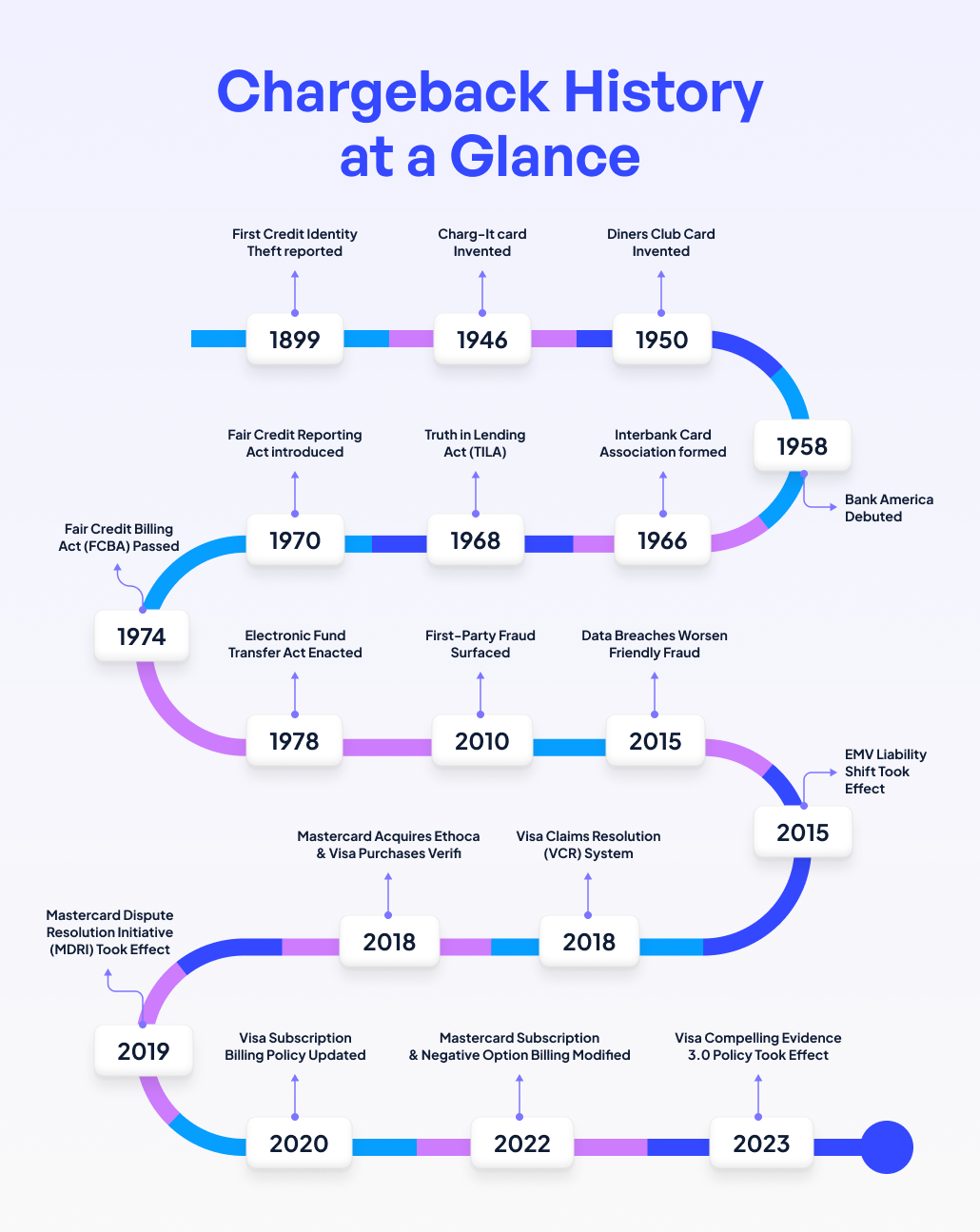
The chargeback history at a glance

How Shopify Payments Chargebacks Work: The Shopify Chargeback Process Step-by-Step

Similar to traditional chargebacks, the entire Shopify Payments chargeback flow bypasses you, the merchant, completely until the notification stage. Funds are reversed first, and you only reclaim them if you successfully fight the dispute.

Here’s exactly how the Shopify Payments chargeback process works in six steps:

Step 1: The customer disputes the transaction.

The cardholder contacts their issuing bank (not you or Shopify), claiming fraud, non-delivery, defective goods, or any other reason. In some cases, these reasons are made, as we uncovered in our chargeback fraud guide.

Step 2: The card issuer files the chargeback.

After reviewing the claim and determining that it meets their criteria, the bank reverses the payment. At this point, the disputed amount, with a non-negotiable chargeback fee, is immediately debited from Shopify Payments.

Many banks are now deploying automated systems to handle this aspect. And there are huge implications for merchants (as you’ll see in the new reality of winning Shopify chargebacks section).

Step 3: Shopify notifies you.

You receive an alert in your Shopify admin dashboard. The notification includes the chargeback reason code, supporting claim details (when available), and your dispute response time limit, which is typically 7-21 days.

Step 4: You build and submit your defense (if you wish to contest).

Depending on your chargeback management strategy, you could either use Shopify’s built-in tools or a third-party, Shopify-native chargeback solution like Chargeflow to file a representment.

Step 5: Shopify forwards everything to the card network.

As the payment facilitator, Shopify bundles your evidence and sends it upstream to the acquiring bank and card network.

Step 6: The Issuing bank or card network decides.

The review and ruling phase can take up to 75 days. Shopify does not influence the outcome, but merely serves as the intermediary. The outcome could be any of these:

  • You won: The disputed amount and chargeback fee are returned.
  • You lost: You lose the disputed amount and the chargeback fee.

There’s also the possibility of a partial win, in which case some of the disputed amount will be returned.

Global chargeback volume 2028, according to Mastercard.

Why Shopify Chargebacks Happen

Drawing from card network rules, Shopify has categorized disputes into eight reason types. Understanding these reasons is not only relevant for dispute recovery but also helps prevent future cases.

Cardholders generally dispute a charge for one of the following reasons:

  1. Fraud
  2. Unrecognised billing
  3. Duplicate charge
  4. Canceled subscription
  5. Product not received
  6. Product unacceptable
  7. Credit not processed
  8. General

Let’s examine these Shopify Payments chargeback reasons in-depth.

Fraudulent

A Shopify Payments chargeback filed under a fraud reason code indicates the cardholder claims they never authorized the charge. It’s the most common dispute type. And while genuine stolen-card fraud does drive a considerable number of these claims, industry data consistently shows that many fraud-coded disputes have nothing to do with actual fraud.

Chargeback abusers gravitate towards this category because banks default to protecting cardholders on fraud claims. A claim of "I didn't authorize this" hinges on intent. You can rarely disprove that from the outside without the requisite tools.

Unrecognised Billing

Shopify Payments chargebacks coded as unrecognized indicate the customer doesn’t recognize your business name on their statement. Payment descriptor confusion and forgotten subscriptions are the common causes of unrecognized billing disputes, and they can often be resolved without escalation.

“About 50% of consumers questioned a purchase in the last 12 months, and 24% did so because they didn’t recognize the details on their statement.”Mastercard

Duplicate Charge

A duplicate chargeback occurs when a customer believes you billed them twice for the same product or service. The most common cause is a genuine clerical error, such as double entry at checkout or a processing glitch that fires the charge twice. In some cases, the transaction was legitimate. The customer was billed for two separate purchases but mistook them for a single duplicate charge, often because the charges appeared close together on their statement or carried similar descriptions.

Subscription Canceled

Shopify Payments chargebacks are coded as subscriptions canceled when the cardholder believes you charged them for a subscription that should have been canceled.

This chargeback vector is one of the highest-risk categories for recurring billing merchants. Subscription billing is consistently cited as one of the highest-risk dispute categories for recurring revenue merchants. This is driven by cancellation failure and friction-heavy offboarding flows. When canceling isn’t straightforward, customers resort to disputing charges through their bank rather than navigating a confusing offboarding process.

Product Not Received

A product not received Shopify Payments chargeback occurs when a customer claims the goods or service they paid for never arrived. On paper, it’s straightforward. But it’s one of the most frequently abused chargeback categories.

For physical goods, carrier delays, porch theft, and address errors create real failures, but deliberate false claims exploit gaps in delivery proof. Dispute analysts and card network data both flag 'product-not-received' as among the most frequently abused chargeback categories. This is partly because delivery gaps are easy to claim and difficult to counter without carrier confirmation and signature records.

Product Unacceptable

A “product unacceptable” Shopify Payments chargeback occurs when a customer receives their order but disputes the chargeback because the item arrived damaged, defective, or materially different from how it was described at the time of purchase.

Unlike a product not received, where the core question is whether delivery happened, this category hinges on order condition and description accuracy.

This is one of the few dispute types where your own product listing becomes evidence. Vague descriptions, low-quality photos, or overstated claims create the conditions for product-unacceptable chargebacks.

Credit Not Processed

A credit not processed Shopify chargeback occurs when a customer returns an item or cancels a transaction, but you did not issue the expected refund. For this, the customer isn’t disputing whether the transaction happened. They’re disputing the absence of a credit they believe they’re owed.

That means, you had previously agreed to the refund in principle, but failed to execute on it, or there was a communication gap.

Hence, the most common triggers of credit not processed chargebacks are processing delays, refunds issued to the wrong payment method, and merchants who received a return but didn’t refund promptly. In some cases, the merchant believes the cardholder is not entitled to a refund, either because of a final sale clause, the return fell outside the return policy window, or the cancellation terms weren’t met.

General

When a Shopify Payments chargeback is coded as general, it means the dispute does not fit into any of the above categories.

This is the least informative code a merchant can receive, and in some ways the most frustrating, because it offers little guidance on what the customer's actual complaint is or what evidence would be most effective in contesting it.

How to Respond to a Shopify Chargeback

When a chargeback notification reaches your Shopify admin, you have two options: accept it or fight it. The right choice depends on the validity of the claim and the strength of your evidence.

Option 1: Accept the Chargeback

Accepting the claim makes sense when the dispute is legitimate, such as when your team made a genuine error, the order is undelivered, or when you have no evidence to counter the dispute. Once accepted, the reversal is permanent, and no fees are refunded.

How to Accept:

  • From your Shopify admin, go to Orders and click the disputed order.
  • Click Submit to confirm.

Alternatively, click the chargeback banner and select Accept chargeback, or navigate through Add evidence on the Chargeback response page and select Accept chargeback from there.

Option 2: Fight the Chargeback

Fighting a chargeback (also known as representment) is recommended for most cases. This means submitting evidence to the card-issuing bank through Shopify to reverse the decision and recover your funds.

To have a credible case, your response typically needs to include proof of delivery, transaction records, customer communications, and any fraud screening data tied to the order.

Why manual responses underperform:

Manually building a response in the Shopify admin has a success rate of less than 20% for many merchants. Most merchants either submit incomplete evidence, miss reason-code-specific requirements, or simply run out of time managing it alongside daily operations.

How to fight smarter with Chargeflow:

Chargeflow is an AI-powered chargeback automation tool built natively for Shopify. Instead of assembling evidence manually, Chargeflow automatically pulls key order data from your store, enriches it with CRM records and customer communications, and submits a complete, bank-compliant response, all without manual input. The result is a win rate 4x above the industry standard.

Getting started takes three steps:

Step 1: Install and connect Chargeflow

  • Go to the Shopify App Store and search for “Chargeflow Prevent Chargebacks” (or visit apps.shopify.com/chargeflow).
  • Click “Add app” → Install → Approve permissions (Chargeflow requests only necessary access to orders, customers, and payments for evidence gathering).
  • Log in or sign up for Chargeflow (free to install; pay only on successful recoveries/preventions).
  • One-click native integration auto-syncs with Shopify Payments (and supports Stripe, PayPal, Recharge, Gorgias, Zendesk, etc., for enrichment).
    1. Historical and incoming disputes sync immediately.
    2. Real-time monitoring begins, Chargeflow starts tracking chargebacks as they reach your store.

Step 2: Activate core automation

  • In your Chargeflow dashboard, go to the Automation or Dispute section.
  • Enable Auto-Submission: This lets Chargeflow automatically build and submit dispute responses on your behalf (turn off if you prefer manual review before submission).
  • Customize Evidence Branding (via Optimization settings): Upload your logo, refund policy, terms of service, and any custom notes. Every dispute will reflect your brand.
  • Choose your Dispute Strategy: Aggressive (max recovery push), Balanced (default, good risk/reward), or Conservative (safer for high-volume stores).
  • Click Save/Activate: Automation goes live instantly. Chargeflow AI analyzes each dispute and extracts evidence from multiple data points for an optimal evidence package.

Step 3: Verify everything is running

  • Dashboard check: Confirm Shopify integration shows "Active/Connected."
  • Look for real-time transaction sync and any queued/existing disputes auto-tagged for response.
  • Automation status should read "Active.”
  • Ensure team permissions are set (in Shopify: Apps → Chargeflow → Manage access for Orders, Customers, etc.).

🔥Bonus: Chargeflow also powers prevention features, such as real-time alerts, analytics, and friendly fraud deflection, preventing chargebacks before they happen.

Shopify Chargeback Evidence and Deadlines

Every second counts in the Shopify Payments dispute process. If you’re a long tail merchant and you’ve not automated the process, you’ll likely miss the deadline. That translates to forfeiting your right to contest the dispute entirely.

Shopify will auto-submit whatever evidence it can compile on your behalf, in its efforts to protect the portfolio ratio. But that baseline submission is unlikely to be effective as a well-prepared merchant response.

Shopify Payments Chargeback Deadlines

Merchant response deadline:

  • Typical range: 7-21 days after the chargeback or inquiry is filed. The precise deadline is shown in the chargeback banner on the order page in your Shopify admin.
  • You can edit/add evidence anytime before the dispute response time limit.
  • Best practice is to submit at least three days before the issuer deadline. Once submitted, no further edits are allowed.

Issuer decision deadline: The issuing bank can take up to 75-120 days to reach a decision, depending on the network and dispute type. Expect most resolutions to land somewhere in the 30-90 day range.

The New Reality of Winning Shopify Chargeback

Chargeback volumes are rising, and so is the gap between merchants who contest disputes effectively and those who don’t.

Mastercard research across merchants of all sizes establishes a consistent pattern: the more a merchant invests in chargeback management infrastructure, the higher their win rate. Large enterprises are winning upwards of 50% of representment cases versus 46% for smaller operators. The same logic applies within Shopify’s ecosystem. Big-head merchants with resources to respond systematically will consistently outperform long-tail merchants improvising on a seven-day deadline.

The more significant shift is happening on the issuer side. Financial institutions are moving away from having human reviewers examine dispute packets on a case-by-case basis. In their place, automated decisioning systems now screen incoming representment for structural completeness, data consistency, and signal quality before any human ever sees the file, if one sees it at all.

The practical consequence for merchants is that the old approach to dispute response (e.g., a PDF of screenshots, a copied order confirmation, a paragraph explaining what happened) no longer clears the initial filter completely. Automated systems aren’t reading your explanation. They’re pattern-matching against expected evidence fields for a given reason code.

This is a structural shift, not a marginal change. It means the gap between merchants with methodical evidence collection and those assembling responses is now wider at the point of first review, not just at the point of final decision. A well-reasoned but unstructured response that might have persuaded a human in 2019 is increasingly invisible to the systems making preliminary rulings today.

Therefore, you must build evidence quality into your operational process, not assembled reactively when a dispute arrives. That means knowing in advance what each chargeback reason code requires, capturing the relevant data at the transaction level, and packaging it in a format that automated review systems can parse without friction.

Types of Evidence That Win Shopify Disputes

Some examples of best evidence by category:

  • Fraudulent/Unauthorized/Unrecognized: AVS/CVV match proof, IP address & country logs, device fingerprint (if available), customer login history, prior order patterns, or authorization records.
  • Product not received: Tracking number and proof of delivery (signature required where possible), shipping confirmation date/time, carrier details, any delivery photos or notes.
  • Product unacceptable/Not as described: Clear product photos/descriptions from your store listing at time of purchase, return policy, emails/photos showing condition on arrival, any customer approval or usage logs.
  • Duplicate: Proof of separate transactions (e.g., order IDs, timestamps, amounts), showing they were for different items/services.
  • Subscription canceled: Timestamped cancellation confirmation (email or dashboard screenshot), proof of billing stopped before next charge, and any reminder sent.
  • Credit not processed: Refund transaction ID/ARN, date processed, amount, and any customer communication confirming the refund.
  • General/Other: Terms of service, refund policy, customer emails agreeing to terms, service logs (for digital), or withdrawal letter if customer drops the dispute.

General file formatting requirements (critical for acceptance):

  • Formats: PDF, JPEG, PNG (PDFs must be PDF/A-compliant).
  • Size limits: ≤2 MB per file; total package ≤4 MB (some older sources note tighter limits).
  • Content: Up to 50 pages per PDF.
  • High-contrast, legible images (black-and-white printable; many banks still use fax). No videos, audio, external links, or zooming/cropping needed.
  • Files must be clearly labeled(e.g., "Tracking_Proof_Order123.pdf").

💡Key Takeaway: Investing in automated systems for structured, data-enriched evidence collection and dispute response helps you close the win-rate gap, often exceeding 50%, like large enterprises.

What Happens If You Lose a Shopify Chargeback

Losing a chargeback isn’t just about one transaction. It impacts your cash flow, but the downstream consequences are what compound.

Immediate financial impact:

  • The disputed amount is permanently reversed and not returned.
  • The chargeback fee (typically $15–$25 equivalent, varying by country/region) is not refunded.
  • If you already issued a partial or full refund to the customer before the chargeback, you lose that money too, and the product (if physical) and any shipping costs.
  • Funds are deducted from your next payout. If your payout balance is insufficient:
  • In the US, Canada, and Australia, Shopify debits your linked bank account directly on payout day.
  • In other regions, the balance carries over and is deducted from future payouts until cleared.

Long-term ripple effects:

  • A higher chargeback ratio can lead to warnings, increased monitoring, or difficulty with future processors.
  • No direct impact on your Shopify subscription or store functionality (unless Payments is restricted).

How to Prevent Shopify Chargebacks

Prevention is the most cost-effective way to protect your revenue, cash flow, and Shopify Payments standing. Shopify’s built-in tools, combined with best practices and third-party apps, can significantly reduce chargebacks before they occur.

Here are the most effective, actionable Shopify chargeback prevention strategies:

1) Enable Shopify Protect

Shopify Protect automatically shields eligible Shop Pay orders against fraudulent and “transaction unrecognized” chargebacks at no additional cost. If a qualifying chargeback occurs, Shopify reimburses the full disputed amount, covers the chargeback fee, and handles the dispute on your behalf.

Coverage applies to US-based merchants only and is limited to physical orders fulfilled with valid carrier tracking within seven days of placement. Digital products, which attract most chargebacks, in-store pickups, and orders shipped through unsupported carriers, are not eligible.

2) Use Shopify’s built-in fraud analysis.

Shopify’s fraud analysis flags suspicious orders before fulfillment. Pay attention to the high-risk indicators: mismatched billing and shipping addresses, high-value orders placed late at night from an unfamiliar location, or an email address that doesn't match the name on the card.

None of these is definitive proof of fraud individually. But in combination, they’re the pattern that precedes the chargeback.

For flagged orders, you have two options: verify directly with the customer before fulfilling, or decline the order entirely. Both are better than fulfilling a high-risk order and absorbing the dispute later.

3) Install a chargeback prevention app

Shopify Protect covers only US-based Shop Pay orders on physical goods, and the built-in fraud analysis relies on a limited set of pre-fulfillment signals. It may not readily catch post-purchase behavioral red flags, cross-reference external fraud networks, or detect friendly fraud patterns that only emerge after purchase.

Full-stack, Shopify-native chargeback apps, like Chargeflow, which provide prevention, recovery, and insights, exist to close those gaps. It analyzes post-purchase signals, flags suspicious orders before fulfillment, and cross-references global merchant network data to catch friendly fraud patterns that Shopify's native tools miss.

Chargeflow operates on a pay-on-success model. You’re only billed when a chargeback is actually deflected and stopped.

4) Make billing descriptors recognizable.

A surprising share of Shopify chargebacks have nothing to do with fraud or product/service dissatisfaction. The customer simply doesn’t know who SYTLEH*3H4029NH is and why they’re being billed. An unfamiliar billing descriptor is often all it takes to turn a legitimate transaction into a dispute.

The fix is not complicated: update your Shopify Payments billing descriptor in Settings → Payments to clearly reflect your store or brand name. A charge showing “YOURSTORE.COM” is far less likely to trigger a dispute than a generic or truncated string that a customer does not recognize. Pair that with an immediate post-purchase email confirming the order under the same brand name, and most unrecognizable transaction disputes never reach the chargeback stage.

5) Optimize product listings and policies.

  • Use accurate, high-quality photos (no heavy editing) and detailed, honest descriptions to avoid "Not as described" claims.
  • Display clear refund, return, and shipping policies prominently (checkout, footer, product pages).
  • For subscriptions: Make cancellation easy, send reminders, and confirm cancellations instantly with proof.

6) Ship smart with tracking and obtain signatures.

Always use tracked shipping (required for Shopify Protect eligibility). Require signatures for high-value orders to strengthen proof-of-delivery against product-not-received abuse. Provide proactive shipping updates and delivery notifications to reduce customer anxiety and buyer’s remorse.

Prioritize quick responses to customer inquiries. Offer easy resolutions before customers escalate to their bank; the chargeback alert enables you to know about the case before it becomes a full-blown chargeback.

A reputation for responsive service deters disputes. Proactive prevention beats reactive fighting.

Final Thoughts on Shopify Chargebacks

Shopify Payments chargebacks compound in ways that single-transaction thinking misses. The disputed amount is the visible cost. The chargeback fee, lost product, ratio pressure, and downstream scrutiny accumulate quietly until they become a structural problem.

The merchants who manage this well treat dispute response as an operational system, instead of a reactive task. They capture evidence at the transaction level, design responses for automated review, and build prevention into fulfillment and billing workflow rather than bolted on afterward.

Large merchants with systematic operations are widening their win-rate advantage, while long-tail stores improvising manually are falling further behind. Issuer automation, rising dispute volumes, and Shopify’s internal ratio enforcement all move in the same direction. Merchants who close that gap now are in a materially better position than those who wait for a threshold breach to prompt action.

Let Chargeflow do the heavy lifting for you. Automate your chargebacks today!

SHARE THIS ARTICLE

Chargebacks?
No longer your problem.

Recover 4x more chargebacks and prevent up to 90% of incoming ones, powered by AI and a global network of 15,000 merchants.

192+ reviews
No credit card needed.
subscribe

The latest chargebacks, fraud, and ecommerce content, in your inbox. Every week.

Sign up now and never miss out the latest trends!
By providing your email you're agreeing to our Terms of Service and Privacy Notice
Diagram with dashed and curved lines forming segmented arcs highlighted by three blue diamond markers on the left side.Abstract circular grid design with blue diamond markers on a half-black, half-white background.
Frequently Asked Questions

Questions?
we’ve got answers.

What makes Chargeflow different from Justt?

Chargeflow collects data from dozens of third party signals, automatically. This allows for much more coverage and much better win rates because the evidence submitted is much more comprehensive and compelling.

How does Chargeflow fight chargebacks?

Chargeflow collects data like order info, customer messages, and payment details. It builds a full dispute case for you, so you don’t have to lift a finger.

Can Chargeflow handle chargebacks from multiple payment processors?

Yes! Chargeflow works with 50+ payment processors. That means one tool for all your chargebacks, no matter how you process payments.

How does Chargeflow’s pricing work?

You only pay a percentage of the revenue we help you recover. No upfront fees, no subscriptions — just success-based pricing.

Is Chargeflow safe to use?

Yes. Chargeflow is SOC 2 Type 2, GDPR, and ISO certified. We use top security standards to keep your data safe.

need more help?

Have a question? We’re here to help. Just hit the chat button to initiate a conversation with support.