%201.svg)




































How to Use AI Payment Routing Tools to Improve Authorization Rates

Chargebacks?
No longer your problem.
Recover 4x more chargebacks and prevent up to 90% of incoming ones, powered by AI and a global network of 20,000 merchants.


 600+ reviews


TL;DR:
- How it decides: The tool scores every available route for each payment using recent approval outcomes, sends the payment down the best one, and falls back to a second route if the first declines.
- What it can change: Routing helps with processor outages, timeouts and issuer-specific soft declines. It cannot fix insufficient funds or a hard decline.
- How to prove it works: Keep a matched control group on your old route and compare net approved revenue per attempt, not the approval percentage alone.
- Retry limits: Card networks cap reattempts and fee excessive ones, so any cascade logic has to read the decline code before it retries.
- Chargeback link: Extra approvals bring extra dispute exposure, so pair every route-level approval rate with the fraud and chargeback rate for the same cohort.
AI payment routing tools are systems that automatically pick the payment processor most likely to approve each transaction, in real time, instead of sending every payment through one fixed gateway. They matter because approvals are slipping: Visa Consulting & Analytics reports that U.S. approval rates have fallen below 87 percent in VisaNet data covering April 2023 to March 2025, the lowest of the regions it compares.
Declines have more than one cause. The issuing bank may be overly cautious with a genuine customer, the processor may time out, the card network may reject a malformed request, or the card details may not match. Routing fixes some of those causes and none of the others. A decline also wastes the spend that brought the customer to checkout, so performance marketing results depend on approvals as much as on clicks.
What Are AI Payment Routing Tools?
Under the hood, these tools evaluate every route connected to your account and select the most suitable payment processor for each transaction, rather than sending every payment through the same gateway or acquiring bank.
They score each available route on signals such as card brand, issuing bank, country, currency, ticket size, time of day, recent approval history by route and processor health. The route with the highest chance of approval, weighed against cost and latency, gets the payment.
Routing is a decision layer on top of the gateways and acquirers you already use. The gateway still carries the transaction and the issuer still decides whether to approve it. "Payment routing" here also has nothing to do with the bank routing number used for ACH and wire transfers: it means choosing the processing path for a card payment. For the wider picture, see our overview of AI in online payments.
Why Payments Decline, and What Routing Can Change
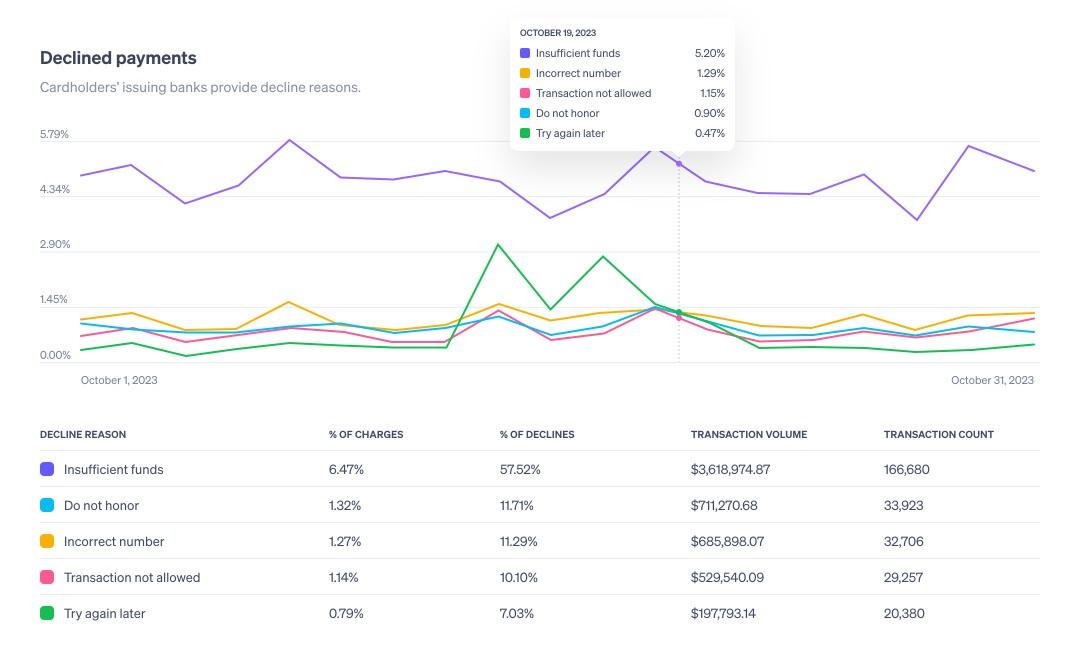
Visa ranks not sufficient funds, suspected fraud and exceeds approval amount as the top three decline reasons globally by amount. Only some of them are routing problems, and a tool that promises to fix all of them is overselling. Every decline also carries a response code, and the code tells you whether to retry: the full list is in our guide to credit card decline codes.
| Decline cause | Who decides | Can routing help? | What helps instead |
|---|---|---|---|
| Insufficient funds | Issuer, based on the cardholder balance | No | A later retry, a dunning message, or a second payment method |
| Suspected fraud | Issuer risk model | Sometimes | Network tokens, 3D Secure, complete AVS and CVV data, and testing which route that issuer approves more often |
| Exceeds approval amount | Issuer limit on the card | Rarely | Ask for another card or offer a split payment |
| Processor or acquirer outage, timeout | Your own processing stack | Yes | Failover to a second processor, which is the clearest routing win |
| Generic soft decline such as "do not honor" | Issuer | Sometimes | A retry on another route or after a pause, within network limits |
| Stolen or lost card, closed account (Visa Category 1 hard decline) | Issuer | No | Never retry; ask the customer for a different card |
| Foreign-issued card sent through a distant acquirer | Issuer risk rules | Sometimes | Testing a local acquirer for that market |
A hard decline is final. A routing tool that cascades a stolen-card decline to a second processor creates fees, not revenue (see the retry limits below). Our guide to why banks decline legitimate transactions covers the recoverable cases in more detail, and false declines explains how to recover good orders without creating new dispute risk.
How AI Payment Routing Works
You do not need to be a machine learning expert to use AI payment routing tools, but the basics help. It works in three steps, and everything happens in milliseconds before your customer notices.
- Data Collection: The customer enters their payment details, and the routing tool adds transaction data. These include card type, issuing bank, currency, location, time, and amount.
- Pattern Recognition: The tool compares the transaction with stored history to spot patterns in past approvals and declines. For example, Visa cards from one issuer may have a higher success rate through Processor X than through Processor Y.
- Real-Time Decisions: The router picks the processor most likely to approve the transaction and sends it. Approval authorizes the payment; capture and settlement follow later.
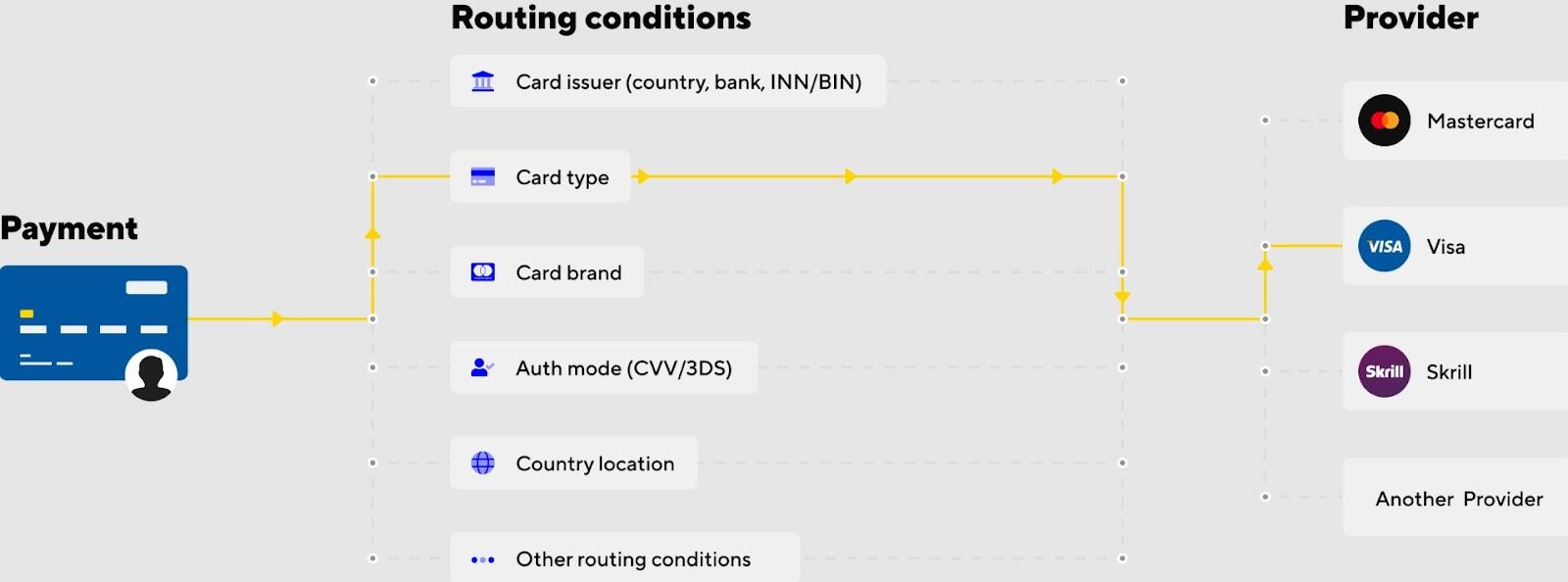
If the first route fails, the system can try a second option without asking the customer to re-enter card details. This supports secure payments and builds customer trust by minimizing checkout friction. Each retry is a separate authorization attempt, so it counts toward the network retry limits covered below.
Static, Dynamic and AI Payment Routing Compared
Static routing sends every payment to one fixed processor. Dynamic routing applies if/then rules, such as sending a card issued in one country to a local acquirer. AI routing replaces hand-written rules with a model that re-ranks routes from recent outcomes. In practice most setups keep hard constraints as rules (never send a currency to a processor that does not support it) and let the model rank the eligible routes.
| Factor | Static routing | Dynamic (rules-based) routing | AI payment routing |
|---|---|---|---|
| Decision logic | One fixed processor or a fixed order | If/then rules on card brand, country, currency or amount | A model scores each route per transaction from recent outcomes |
| Adaptability | Changes only when someone edits the setup | Changes when someone edits the rules | Re-weights routes as approval patterns shift, within limits you set |
| Retry handling | Declines end, or someone retries by hand | Cascades to a fixed backup in a set order | Decides whether, when and where to retry based on the decline type |
| Data used | Which gateway is configured | Static attributes such as BIN, country and ticket size | Outcome history by issuer, route, time of day, latency and cost |
| Maintenance | Low effort, drifts out of date | Rules go stale as issuer behavior changes | Needs clean data and review of how decisions are made |
| Transparency | Complete | Complete, rules are readable | Varies by provider; ask for a reason code per decision |
| Best for | Single market, low volume | Known, stable patterns | High volume across many issuers, countries and card types |
US debit adds a separate routing choice. Under the Federal Reserve's Regulation II, debit issuers must enable at least two unaffiliated networks for debit transactions, including card-not-present ones, since the final rule took effect on July 1, 2023. That gives merchants a network choice on online debit; see how PINless debit networks such as PULSE, STAR, NYCE and Accel work.
How to Use AI Payment Routing Tools
Setup takes six steps. Each one depends on the baseline from the step before it.
Step 1: Understand Your Current Payment Routing Setup
When learning how to use AI payment routing tools, the first step is mapping your current payment flow. You need to find out the following:
- Do all transactions go through a single payment processor?
- Are you seeing high decline rates in specific regions or card types?
- Do you have backup options in case a payment fails?
Then calculate your baseline authorization rate: approved authorization attempts divided by total attempts. Pull it per route and cut it by card brand, issuer country, ticket size, new versus returning customers, and one-off versus recurring payments. Count each order once, so a payment approved on the second attempt is one approved order, not one decline plus one approval, and track soft and hard declines separately because only soft declines are worth retrying.
Your finance or payments team, or your payment provider, can give you the breakdown by geography, card type and issuing bank. This baseline is what you will measure the tool against.
Step 2: Choose the Right AI Payment Routing Tool
It is not enough to want AI routing. Routing logic lives in one of three places, and where it lives limits what the tool can see and route between.
Scroll to compare all columns. Use the arrow keys when the table is focused.
| Where routing lives | What it routes between | Trade-off |
|---|---|---|
| Built into your payment service provider | Paths inside that one provider's acquiring setup | Quick to switch on, but it only sees and optimizes its own traffic |
| A payment orchestration layer | Several processors and acquirers | Most routing freedom, but another integration and another vendor in the payment path |
| In-house rules and models | Whatever you build and connect | Full control, and you own the data quality, monitoring and maintenance |
Processor-native examples include Adaptive Acceptance, which runs inside Stripe, and Uplift from Adyen. Adyen's Uplift page states up to a 6 percent increase in conversion without publishing a methodology, so treat vendor ranges as ceilings and confirm them on your own traffic with the holdout test in Step 3. You do not need to be a tech expert to choose, but involve your payments and dev teams early.
Rank candidate tools with a feature prioritization matrix that reflects your budget and customer base. Questions to put on it:
- Does it integrate with your current payment gateway or platform?
- Can it work across multiple acquirers or processors?
- Can you see why a route was chosen, and override it manually?
- Does it support network tokens and 3D Secure decisions?
- Does it enforce network retry limits and treat hard declines as final?
- Does it cover your target regions, and how is it priced (share of volume or per transaction)?
Step 3: Set Up and Integrate the AI Payment Routing Tool
The next step is to integrate the tool with your checkout system. Most platforms offer APIs or built-in connectors. This usually involves:
- Connecting your existing payment gateways to the tool
- Defining fallback rules (for example, "If Processor A fails, try Processor B")
- Letting the routing engine analyze your past transaction data to build a performance profile
- Enabling smart routing logic that selects the best processor in real time
Some tools ship pre-configured strategies based on global benchmarks. Treat them as a starting point, because your issuer mix is not the global average. A single test transaction proves the connection, not the lift. To prove the lift, keep a fixed share of traffic, such as 10 to 20 percent, on your old route as a control. Match the control to the test group by card brand, issuer country and ticket size, run both long enough to cover your normal weekly pattern, and compare net approved revenue per attempt, not just the approval percentage.
Step 4: Train the AI Payment Routing Engine with Your Data
AI payment routing tools improve with volume. The more payments you run through the system, the better it gets at selecting efficient and cost-effective routes. Over time the engine learns which processors approve most often by geography and card type.
It can also identify the best times to retry failed transactions and adjust routing when conditions change, such as website downtimes or spikes that call for stricter ecommerce fraud prevention.
Feed the system complete, clean transaction data. Issuers score the authorization request on what it contains, so send full AVS data, the CVV, 3D Secure results and stored-credential indicators for returning customers, and keep merchant details consistent across processors. If your provider supports historical data training, use it so the tool starts with informed routing decisions.
Step 5: Monitor Performance and Optimize Over Time
Review routing performance on a fixed cadence, the way a team reviews SaaS email marketing campaigns. Disputes can arrive weeks after approval (card network windows commonly run up to 120 days), so judge a route on cohorts that have had time to mature. Track every routing metric next to a dispute-side metric:
| Routing metric | Pair it with | What the pair shows |
|---|---|---|
| Authorization rate by route | Fraud and chargeback rate for the same cohort | Whether the extra approvals are good orders |
| Recovered revenue from retries and fallbacks | Refund and dispute rate on recovered orders | Whether recovered payments hold up |
| False decline rate | Fraud losses over the same period | Whether you traded one problem for another |
| Approval rate by processor and region | Retry count per card | Which routes work, and how close you are to network retry limits |
Many tools include built-in dashboards for trend monitoring, and your provider's success team can help tune routing logic or spot new opportunities. If your support team answers failed-payment emails, an email analytics tool such as timetoreply can measure how quickly customers get a reply.
Step 6: Combine with Other Smart Payment Features
If the goal of AI routing is a higher authorization rate, pair it with these features:
- Retry Logic: Use AI to choose the best time and method to retry failed payments, inside the network limits below.
- Card Network Tokenization: Network tokens replace card numbers with tokens issuers can trust more. Visa reports a 4.6 percent lift in authorization rates for card-not-present token transactions versus card numbers (fiscal 2022), and says tokenization can reduce suspected-fraud declines.
- Local Payment Methods: Offer alternatives such as PayPal or local wallets in markets where card approval rates are low.
- Dynamic 3D Secure: Apply extra authentication only when risk or regulation calls for it, not on every transaction.
Retry Limits You Cannot Route Around
Visa and Mastercard both charge for excessive reattempts, and an AI router that cascades a declined card across processors can reach those limits quickly. The limits below are as reported in merchant guidance from PayPal (May 2026) and TabaPay. Rules vary by region and change, so confirm them with your acquirer.
Scroll to compare all columns. Use the arrow keys when the table is focused.
| Network | Never retry | Soft-decline retry limit | Fee above the limit |
|---|---|---|---|
| Visa | Category 1 declines | More than 20 retries in 30 days | $0.10 per domestic and $0.25 per cross-border transaction |
| Mastercard | Hard decline codes 04, 14, 15, 41, 43 and 54 | 10 per day and 35 in 30 days | About $0.40 to $0.50 per soft-decline violation, varying by region |
Ask any routing vendor how it counts attempts: a fallback that re-sends the same declined card may add to the total at merchant level. A tool that ignores decline codes can turn a recovery feature into a fee line.
Routing for Cross-Border and Multi-Region Payments
A common rule sends a card issued in one market to an acquirer licensed in that market. AI routing tests that rule against actual results per country instead of assuming it holds, and it can shift volume when an issuer or region changes behavior. If you sell in several regions, an international payment service provider with local acquiring options gives the router more routes to choose from. Review how cross-border payments flow before you set per-country rules.
Where the Levers Sit by Business Model
Which tools improve approval rates depends on the traffic you have. The routing logic that matters changes with the business model:
| Business model | Biggest approval lever | Watch out for |
|---|---|---|
| Ecommerce | Failover plus issuer-aware routing on card-not-present traffic, with 3D Secure only when needed | False declines on high-value orders that look like fraud to the issuer |
| Subscriptions and SaaS | Decline-code-aware retries and fallback routes for recurring charges, with current network tokens | Retry limits, and involuntary churn from payments that were never recovered |
| Marketplaces | Routing by seller region and currency across several acquirers | Who carries dispute liability between the platform and the seller |
| Travel and high-ticket | Testing higher-value authorizations per route, with authentication in the flow | Exceeds-limit declines, and a long gap between booking and service that raises dispute risk |
| Digital goods | Fast approval paired with tight fraud screening | Fraud-driven chargebacks on goods delivered instantly |
| Fintech and crypto | Routes through acquirers that accept the merchant category | Acquirer appetite and monitoring-program exposure |
For recurring billing, the retry schedule matters as much as the route: see our guides to a recurring payment service provider, smart dunning and involuntary churn. For online stores, the ecommerce payment service provider guide covers checkout-side options.
Challenges of Using AI Payment Routing Tools
Integration can be complex, especially for businesses with legacy payment systems. AI payment routing tools need large volumes of clean transaction data to be effective, which smaller businesses may lack.
Relying too heavily on automation without human oversight can miss unusual customer scenarios, and managing relationships with multiple processors adds operational complexity. Not every tool is transparent about how it arrives at routing decisions, which makes it harder to troubleshoot failed transactions or apply a temporary manual rule when you need one.
Teams with a growth mindset tend to handle this well: they change one routing variable at a time, keep a control group, and keep only what the data supports.
Pair Routing With Chargeback and Fraud Controls
Every extra approval passes through the same fraud and dispute exposure as the rest. Routing is only one of six stages where AI in payment processing moves revenue. Mastercard's chargeback cost research, by Datos Insights, projects that global chargeback costs will rise from $36.9 billion in 2026 to $46.1 billion in 2029. On the Visa side, merchants at a 1.5 percent ratio reach the Excessive tier of the Visa Acquirer Monitoring Program (effective April 2026). Loosening declines to lift approvals without a risk view can push you toward those lines, which is why fraud false positives should be weighed against downstream chargebacks.
Routing decides which processor carries the payment. It does not screen the order, deflect a dispute or build evidence. AI fraud detection covers the screening side. Chargeflow Prevent scans orders after checkout and before fulfillment, so you can cancel, verify or approve them. Chargeback alerts from Verifi RDR, Ethoca and CDRN flag a dispute before it becomes a chargeback, and Chargeflow Alerts acts on them. For the ones that still arrive, AI in chargeback disputes explains where automated evidence helps and where it does not, and Chargeflow Automation builds and submits the evidence for a 25 percent fee on recovered chargebacks.
Frequently Asked Questions
What is payment routing?
Payment routing is the process of choosing which processor, acquirer or card network carries a payment. It is separate from the bank routing number used for ACH and wire transfers. A routing engine can use fixed rules or a model that scores each route per transaction.
What is the difference between static and dynamic payment routing?
Static routing sends every payment through one fixed processor or a fixed order. Dynamic routing chooses a route per transaction using rules or a model, based on factors such as card brand, issuer country, amount and recent approval results.
What is a good authorization rate?
There is no single benchmark, because the rate depends on region, card type, ticket size and customer mix. Network-wide averages are context, not targets, so compare your rate with your own history by cohort and by route.
Can AI payment routing fix a hard decline?
No. A hard decline, such as a stolen card or closed account, is the issuer refusing that card, and networks tell merchants not to resubmit it. Routing helps with outages, timeouts and issuer-specific soft declines, not with the issuer deciding against the card.
How much can AI routing improve authorization rates?
It depends on your traffic and your starting point. Published lift figures are vendor-reported and use different methods, so run a holdout test against your current route and compare net approved revenue per attempt and dispute rates before you rely on any number.
Do payment processors use AI to increase authorization rates?
Yes. Several processors publish optimization products that reformat requests, retry selected declines and choose routes, but they can only see and route within their own network. A multi-processor setup adds an orchestration layer that compares routes across providers.
Is an AI payment gateway the same as AI payment routing?
No. A gateway transmits payment data to the processor. AI payment routing is the decision layer that chooses which gateway, processor or acquirer receives each payment, so the two usually run together.
Is AI payment routing worth it for a small merchant?
Usually only with several processors and enough volume to learn from. With one processor and low volume, start with rules, clean data, network tokens and the processor's built-in optimization, then add a routing layer as volume grows.
Chargebacks?
No longer your problem.
Recover 4x more chargebacks and prevent up to 90% of incoming ones, powered by AI and a global network of 20,000 merchants.


.png)